




Apple Home's journey with robot vacuums has been a long time coming, but with iOS 18.4, that wait is finally over. You can now control compatible robot vacuums directly through Apple's Home app, thanks to the company's embrace of the Matter universal standard. This breakthrough solves a real pain point for smart home enthusiasts who have been juggling multiple manufacturer apps just to manage their cleaning devices—imagine controlling your lights with one app, your vacuum with another, and your security system with a third.
Apple introduced robot vacuum functionality through its universal Matter standard support, bringing all the core functionality you'd expect: starting and stopping cleaning cycles, adjusting power settings, monitoring vacuum and mop status, and sending your robot back to its charging dock. What makes this particularly exciting is the seamless voice control integration. You can now tell Siri to "vacuum the kitchen" or "stop cleaning" without needing to remember which app controls which device. These smart cleaning devices can now participate in automated routines and respond to Siri voice commands, just like any other HomeKit device.
Understanding Matter's role in HomeKit integration
This breakthrough wouldn't be possible without Matter, the universal smart home standard that's been quietly revolutionizing device compatibility behind the scenes. Think of Matter as a universal translator that allows different manufacturers' devices to communicate seamlessly with various smart home platforms. Apple's robot vacuum support becomes possible through the company's adoption of the Matter protocol, eliminating the compatibility barriers that previously kept robot vacuums out of Apple's ecosystem.
The current implementation leverages Matter 1.2 and newer versions, each offering progressively better capabilities. Matter 1.2 enables users to control basic functions like starting and stopping cleaning cycles, adjusting cleaning modes, and receiving device notifications. However, newer iterations bring enhanced features—Matter 1.4 introduces support for enhanced room-specific cleaning control compared to basic start-stop functions in earlier versions, allowing you to direct your vacuum to specific rooms rather than just general cleaning commands.
There are some important limitations to understand upfront. Advanced capabilities such as map editing and virtual boundary creation remain unavailable in Apple Home. This limitation exists because Matter prioritizes universal compatibility over advanced features—ensuring that basic functions work reliably across all platforms rather than attempting to support every possible capability that might not translate between different ecosystems.
Which robot vacuums work with Apple Home today?
The current landscape of compatible models is expanding rapidly as manufacturers roll out firmware updates to enable Matter support. Roborock has emerged as an early leader, delivering the broadest Matter support so far across its premium lineup.
Roborock leads the charge with multiple certified devices, including the S8 MaxV Ultra, Saros Z70, and several Qrevo series models that now support Apple Home through firmware updates. Their flagship Saros Z70 deserves special mention—it features a retractable robotic arm that can actually pick up socks, shoes, and small toys, then deposit them in predetermined locations. However, these pickup features are not controllable through Apple Home and remain app-exclusive. Still, the company delivered firmware updates between April 1 and 10, 2025, covering seven premium models, including the Saros 10, Saros 10R, and the Qrevo Curv, Edge, and Master variants.
iRobot has made its entry with a significant flagship model. iRobot's Roomba Combo 10 Max is the company's first Matter-enabled device with full Apple Home integration. This 2-in-1 vacuum and mop comes with a multifunctional base station that handles emptying, mop cleaning, and recharging—all controllable through Apple Home. It's a strategic choice for iRobot's Matter debut, showcasing its most advanced capabilities.
Ecovacs completes the current trio of major manufacturers with Matter support. Ecovacs offers Matter certification for three models—the X2 Combo, X8 Pro Omni, and T50 Pro Omni—though firmware updates are still pending for some devices. The X2 Combo has been working with Matter since mid-2024, giving it the longest track record of Apple Home compatibility, while their newer Pro Omni models received certification more recently and are waiting for final firmware rollouts.
What you can and can't do through Apple Home
The current Apple Home integration prioritizes reliability and ease of use over comprehensive feature access. This approach makes sense—it's better to have rock-solid basic controls than spotty advanced features that might confuse users or fail intermittently.
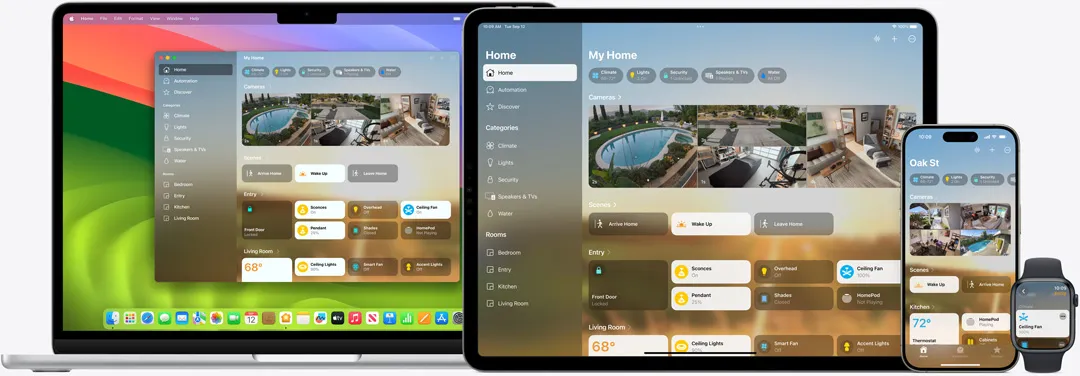
Through the Home app, users can control fundamental operations, including starting cleaning sessions, adjusting power settings, and directing robots back to their charging stations. The interface is clean and intuitive, presenting these controls in the same familiar format as other HomeKit devices. You can check battery status, see whether the vacuum is currently cleaning or charging, and get basic error notifications if something goes wrong.
Voice control through Siri supports natural, basic commands such as "vacuum the kitchen" or "stop cleaning," making hands-free operation seamless across Apple devices. Commands like "Hey Siri, start vacuuming," "vacuum and mop the kitchen," or "send the vacuum back to the dock" work consistently. The system recognizes room names you've configured in Apple Home, so room-specific commands work when rooms are defined in Apple Home, not via manufacturer maps.
The limitations become apparent when you need more granular control. Sophisticated features like detailed room mapping, custom cleaning routines, and specialized suction settings remain exclusive to manufacturer apps. Want to create a custom routine that uses high suction in the living room but gentle mode in the bedroom? You'll need to switch back to the Roborock or iRobot app. The same applies to setting up virtual boundaries, scheduling complex cleaning patterns, or adjusting mop moisture levels for different floor types.
For many users, though, what's available through Apple Home covers the vast majority of daily interactions with their robot vacuum. Starting a cleaning cycle when you leave for work, checking if the vacuum got stuck under the couch, and calling it back to base represent the core use cases that most people actually need.
Setting up your robot vacuum in Apple Home
Getting your robot vacuum connected to Apple Home is refreshingly straightforward, provided you have the necessary components in place. The requirements are minimal but essential: you'll need iOS 18.4 or later, a Matter-compatible robot vacuum, and a Matter hub such as a HomePod, HomePod mini, or Apple TV.
The Matter hub requirement is crucial—this device acts as the local coordinator that translates between your vacuum's Matter communications and Apple's HomeKit protocol. If you don't already have a HomePod or Apple TV, this represents an additional investment, but these devices also serve as excellent smart home hubs for other Matter and HomeKit devices.
The setup process involves opening the Home app, selecting "Add Accessory," and either scanning the Matter pairing code or entering it manually. You'll find the Matter code on a sticker somewhere on your vacuum or accessible through the manufacturer's app—most companies have made this easy to locate. The pairing process typically takes just a few minutes, though it's worth ensuring your vacuum is connected to the same Wi-Fi network as your other HomeKit devices.
The post-setup customization is where you can optimize the experience. Once connected, you can assign the vacuum to specific rooms and create custom names for easier Siri voice control. Taking time to give your vacuum a memorable name and properly assign it to the right room makes voice commands much more intuitive. Instead of saying "Hey Siri, start the robot vacuum in the kitchen," you can simply say "Hey Siri, vacuum the kitchen."
Where smart home automation gets interesting
The real value of Apple Home integration emerges through automation possibilities that weren't practical when robot vacuums lived in isolation. Having these devices as first-class HomeKit citizens opens up creative automation scenarios that can genuinely improve your daily routine.
Robot vacuums can now participate in HomeKit automation scenes, allowing users to trigger cleaning sessions based on other smart home events. The most obvious example is creating a "leaving home" automation that starts the vacuum when your phone detects you've left the house. But you can get much more sophisticated than basic location triggers.
Consider more nuanced scenarios: a routine where your vacuum starts cleaning at 6 PM on weekdays, but only if your security system confirms everyone's out and your smart doorbell hasn't detected any recent deliveries. Or perhaps you want the living room vacuumed every time you finish watching a movie, triggered by your Apple TV turning off and the room's lights dimming to their evening settings.
You can create routines that automatically start cleaning when you leave the house or coordinate vacuum operation with other smart devices like lights and security systems. The beauty lies in the interconnectedness—your vacuum can now respond to the same environmental cues as your other smart devices, creating a more cohesive automated home experience.
The consolidation benefit cannot be overstated. This integration reduces the need to juggle multiple manufacturer apps for daily use, centralizing smart home control within Apple's ecosystem. If you're already invested in HomeKit, adding robot vacuums to your existing scenes and automations feels natural and logical, rather than requiring you to learn yet another interface or remember another set of commands.
What's coming next for robot vacuum integration?
The current state represents just the foundation of what's possible as both Matter and manufacturer support continue evolving. The roadmap looks promising, with several developments that should significantly expand capabilities and compatibility.
Roborock plans to extend Matter support to additional models, including the S8 Max Ultra and Qrevo Slim, in the coming months. The company appears committed to making Matter integration a standard feature across its premium lineup rather than treating it as a niche capability. This suggests we'll see broader compatibility rolling out systematically rather than in sporadic updates.
The Matter protocol itself continues advancing, which should unlock more sophisticated controls over time. Matter protocol evolution continues advancing robot vacuum capabilities, with newer versions like Matter 1.4 offering enhanced room-specific cleaning control compared to basic start-stop functions in earlier versions. As the standard matures and manufacturers adopt the latest versions, features like detailed room selection, custom cleaning intensity per room, and more granular scheduling should become available through Apple Home rather than requiring manufacturer apps.
The broader industry adoption pipeline looks encouraging for expanded choice. Major manufacturers, including Dreame, Eufy, and SwitchBot, are actively working on firmware updates to bring their devices into the Apple Home ecosystem. Dreame's X40 Ultra and X50 Ultra are already certified and waiting for firmware updates, while Eufy has several models in various stages of certification. SwitchBot's compact K series models are also gaining Matter support, potentially bringing Apple Home integration to smaller living spaces where full-sized robot vacuums aren't practical.
Bottom line: if you're in the market for a new robot vacuum and you're invested in the Apple ecosystem, Matter compatibility should definitely be on your checklist. The integration might not be perfect yet, but it's solid enough for daily use and is improving steadily. Being able to tell Siri to clean up while you're juggling kids, work calls, or whatever life throws at you represents the kind of smart home convenience that actually makes a meaningful difference in your routine.













Comments
Be the first, drop a comment!