



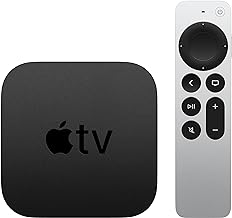


Apple TV 4K audio dropout bug fixed in tvOS 26.4
Apple released tvOS 26.4 this week with a fix for a specific Apple TV 4K audio problem: sound cutting out when switching between apps or content types. If you've been living with silent dropouts mid-transition, this update is the one to install.
Apple's tvOS 26.4 release notes confirm a fix for "an audio issue that could cause sound to drop out when switching between apps on Apple TV 4K." That's the full extent of Apple's public statement on the matter. No prior support document acknowledged the bug; the release notes are the first official confirmation it existed.
Does this bug match what you experienced?
Not every Apple TV 4K audio problem is the same one. The fix Apple confirmed is narrow: audio dropping out specifically during app-to-app transitions on Apple TV 4K. Before updating and assuming the problem is solved, it helps to know whether your symptoms fit.
The pattern the release notes address involves sound going silent while video continues playing normally, triggered by switching between apps. A typical scenario: you finish watching a film in a streaming app that outputs Dolby Atmos, then switch to a music app or a game that outputs a different format, and audio cuts out entirely. The picture keeps running. The issue isn't a crash or a freeze. It's a failure in how the Apple TV negotiates audio format handoffs between apps.
A force-quit of the app, or disconnecting and reconnecting the HDMI cable, temporarily restores sound, per the tvOS 26.4 release notes. But the dropout tends to return in the next session, which distinguishes it from a one-off glitch.
This format negotiation step matters because modern streaming apps don't all speak the same audio language. A Dolby Atmos stream, a stereo podcast, and a game's multichannel output each make different demands on the signal chain. When the Apple TV hands off between them cleanly, nothing sounds off. When that handoff breaks, the result is silence, and the device often appears to be functioning normally in every other respect.
If your symptoms look different audio sync that drifts behind the picture, incorrect channel balance, or audio problems confined to one specific app regardless of what else you've been using this patch probably isn't the fix. Those symptoms point to a separate configuration problem or an app-level issue.
What Apple confirmed, and what remains open
Apple's release notes confirm a fix for the app-transition audio dropout on Apple TV 4K. That's confirmed. Several related questions aren't.
Apple's documentation doesn't specify which generations of Apple TV 4K are affected. It doesn't describe what internal change was made, and it doesn't clarify whether the fix covers every audio format combination or only the transitions between the most common formats. Those gaps aren't unusual for Apple software release notes, which tend toward the terse, but they do mean there are limits to what the patch can be said to guarantee.
What that means practically: if you updated, restarted, and the audio dropout is gone, the fix worked for your setup. If the dropout persists after a full restart of the Apple TV and connected audio hardware, something else is likely at play. That "something else" probably involves your receiver or soundbar configuration, not a failed patch.
After you update: a short decision path
This is a focused if/then, not a general audio troubleshooting guide.
If your symptoms match the app-switch dropout pattern: Install tvOS 26.4, then restart the Apple TV and any connected receiver or soundbar. The update alone may not force the devices to renegotiate audio format settings. A clean reboot of the full signal chain, starting from the Apple TV and working through to the audio hardware, gives the fix the best chance of taking effect.
If audio problems persist after updating and restarting: Two steps are worth taking before assuming the patch failed. First, check audio format settings under Settings → Video and Audio → Audio Format and confirm the Apple TV is set to output a format your receiver actually supports. A mismatch there can produce silent dropouts that look identical to the bug the patch addressed. Second, replicate the transition that originally caused the problem. If the failure behaves differently now, it's a different issue. Connecting the Apple TV directly to the TV, bypassing the receiver entirely, is a clean isolation test: if audio works normally in that configuration, the problem is in the receiver's handling of the Apple TV's signal.
If you never experienced audio problems: The update includes security patches, per Apple's security content documentation, and is worth installing regardless.
Why this kind of bug stings for home theater users
For users who chose Apple TV 4K over a built-in smart TV platform or a budget streaming stick specifically because of audio format support, a dropout during app transitions hits where it hurts most. The device's pitch to that audience is seamless handling of Dolby Atmos, DTS:X, and format switching across a full content library. Silent audio that requires a cable reconnect to restore isn't a minor inconvenience in that context; it's the core promise breaking.
The troubleshooting loop this bug put people through was also genuinely disorienting. The picture kept playing. The receiver showed a signal. The Apple TV reported no error. That combination tends to push users toward suspecting the receiver, the cable, or the HDMI port before they consider the source device's software. People replaced cables. Some swapped HDMI ports. Some assumed a firmware update on the receiver was at fault. The problem was upstream the whole time, per Apple's confirmation in the release notes.
Apple fixed it without ever publicly acknowledging it. There was no support document, no advisory, no forum response confirming the issue was on Apple's radar. The release notes are the first and only official record. That's how Apple tends to handle Apple TV software bugs, per the tvOS release history, and it has a predictable consequence: affected users often spend weeks assuming they've misconfigured something, because there's no external confirmation that the fault lies in the software.
The practical lesson from that pattern is straightforward. When an Apple TV audio problem appears, behaves inconsistently, and doesn't respond to the obvious fixes, the release notes for the next software update are worth reading carefully. Apple's silence on a bug in the interim doesn't mean the engineering team hasn't identified it.
The bottom line on tvOS 26.4
Update, restart everything in the signal chain, and retest the specific transition that caused the problem. That sequence gives the fix the best chance of working.
If the dropout is gone after that, you're done. If it persists, the patch addressed a different bug than the one affecting your setup. Apple confirmed a narrow fix tied to app-switch audio dropouts on Apple TV 4K; if your symptoms don't fit that description, tvOS 26.4 isn't the answer to your particular problem. The configuration steps above are the next place to look, and bypassing the receiver entirely remains the fastest way to determine whether the Apple TV or the downstream audio hardware is the source of the issue.







Comments
Be the first, drop a comment!