



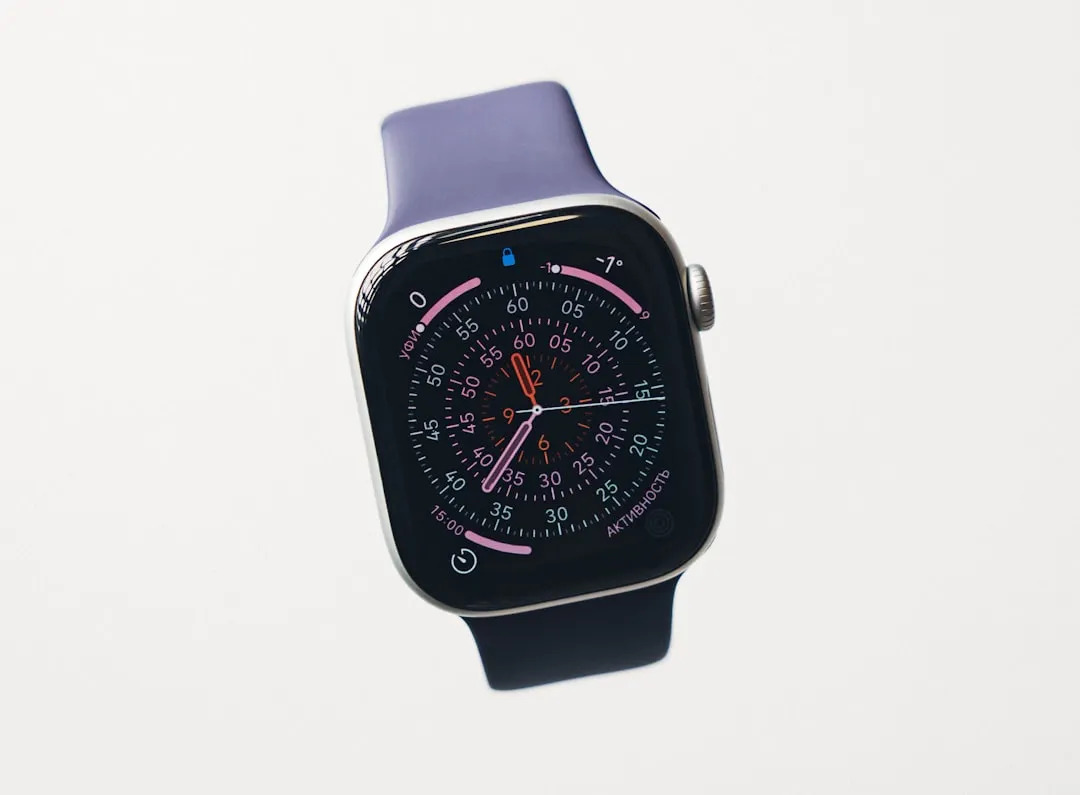
watchOS 26.5 Pride Luminance Watch Face: Colors, Layouts, and Complications
The watchOS 26.5 Pride Luminance watch face arrives with more color and layout flexibility than nearly any other face in Apple's current library. Two geometric patterns, two dial shapes, up to 12 user-selected colors, and four complications in one configuration MacRumors described it last week as one of the most versatile watch faces Apple has introduced.
Apple shipped release candidates for watchOS 26.5, iOS 26.5, and iPadOS 26.5 last week. Both MacRumors and Macworld expected public availability this week; as of today, Apple has not confirmed the public rollout. Once the updates are installed, the face and matching wallpapers will be available to add through the watch face and wallpaper galleries, per Apple Newsroom.
The update also patches two bugs: Messages on Apple Watch may fall back to SMS instead of iMessage on dual-SIM iPhones, and Workout app audio alerts can fail when the paired iPhone isn't nearby, Macworld reported. For affected users those fixes are the priority. For everyone else, the watch face is the story.
watchOS 26.5 Luminance face customization: what sets it apart
Most Apple Watch faces force a choice. Infograph packs six complication slots into a design that leaves almost no room for color or visual personality. Kaleidoscope looks genuinely striking but gives you no functional information at a glance. Pride Luminance occupies different ground the design doesn't ask you to pick a side, according to a review at allthingsgeek.me.
Two geometric patterns define the layout. Radial distributes color as rays extending outward, aligned with the hour markers closer to a starburst than a gradient. Vertical runs horizontal stripes across the display, echoing the layered weave of the matching Sport Loop band. Apply either pattern to two dial shapes, and you have four distinct visual configurations before a single color has been chosen, per MacRumors.
The dial shapes are Rectangle, which fills the display edge-to-edge with color, and Circle, a centered dial that supports up to four complications. That last detail matters: Circle puts Pride Luminance in practical range of Apple's utility-focused faces, not just the decorative ones.
Color selection runs from one to twelve choices drawn from a palette covering every rainbow hue, intermediate shades, and neutrals including black, white, brown, and gray, MacRumors reported. Apple includes pre-configured combinations mapped to specific Pride flag palettes, but users aren't limited to them the face supports fully custom selections.
Last year's Pride Harmony face, released via watchOS 11.5, introduced a dynamic wallpaper alongside a hand-assembled Sport Band, per Apple's 2025 announcement. Luminance adds a dual-layout system, deeper color control, and complication support a clear expansion of what Apple has been willing to build into a Pride release.
Which configuration to choose
Rectangle is the visual-first option. Color fills the display edge-to-edge with no complications; it suits anyone comfortable swiping for data rather than reading it at a glance.
Circle opens up four complication slots. Activity rings, calendar events, weather, world clocks the full color system stays intact either way, MacRumors confirmed.
The preset Pride flag palettes are a starting point, not a constraint. The same system supports team colors, a personal wardrobe palette, or a monochrome setup which is what makes the "seasonal face" label feel imprecise, as MacRumors noted. Pride Month is the occasion for releasing it. The customization options work in October just as well.
How the animation behaves
Luminance is state-aware. When the wrist drops, the color field contracts into slim lines on a black background; raise the wrist and the full palette expands back into view, MacRumors documented. It reads more like a reveal than a standard display wake. Separately, the colors drift slowly across the face over time a gradual ambient shift that keeps the display from feeling frozen during extended wear.
Apple describes the colors as "refracting dynamically," a deliberate echo of the Sport Loop's physical construction, whose layered nylon weave creates the illusion of depth and movement in a flat band, according to Apple Newsroom. The visual logic threads from hardware into software consistently.
One gap no available source addresses: how the animation interacts with the always-on display, or whether it carries a meaningful battery cost. Worth confirming before committing to it as a full-time face.
The Apple Pride Luminance watch face as part of a larger release
The watch face is one piece of a three-part release. The Pride Edition Sport Loop, woven from 11 colors of nylon yarn in a layered pattern designed to create visual depth, is priced at $49 and available in 40mm, 42mm, and 46mm sizes, per Apple Newsroom. The band went on sale last week, ahead of the software updates.
iOS 26.5 and iPadOS 26.5 bring a matching Pride Luminance wallpaper with the same up-to-12-color system, applicable to both Lock Screen and Home Screen, MacRumors detailed. The lock-state animation mirrors the watch face: colors compress onto a black background when the iPhone is locked, and expand when unlocked.
Band, watch face, phone and tablet wallpaper all three share the same color inputs, geometric structure, and state-aware animation logic. The 2025 collection had a dynamic wallpaper and a distinctive band. The 2026 version adds cross-device animation parity and a substantially more flexible customization system, comparing Apple's 2025 and 2026 collections.
Getting the face and what to check before updating
The face and wallpapers become available in their respective galleries once watchOS 26.5, iOS 26.5, and iPadOS 26.5 are installed. Based on Apple's approach with the 2025 Pride Harmony face, the watch face is also expected to be downloadable through the Apple Watch app, Apple Store app, or apple.com though Apple has not confirmed that same acquisition path for the 2026 release, per the 2025 collection announcement.
Specific Apple Watch model compatibility has not been published. Check Apple's support documentation to confirm your device is eligible before updating.
The two bug fixes in watchOS 26.5 dual-SIM iMessage behavior and offline Workout audio alerts are narrow and targeted, per Macworld. The watch face is what gives this update substance beyond the patch notes. Whether Apple eventually moves a face with this level of flexibility into the permanent standard library, rather than treating it as an annual addition that fades from active use by July, no source has said but the annual pattern is building toward a question Apple will have to answer.















Comments
Be the first, drop a comment!