



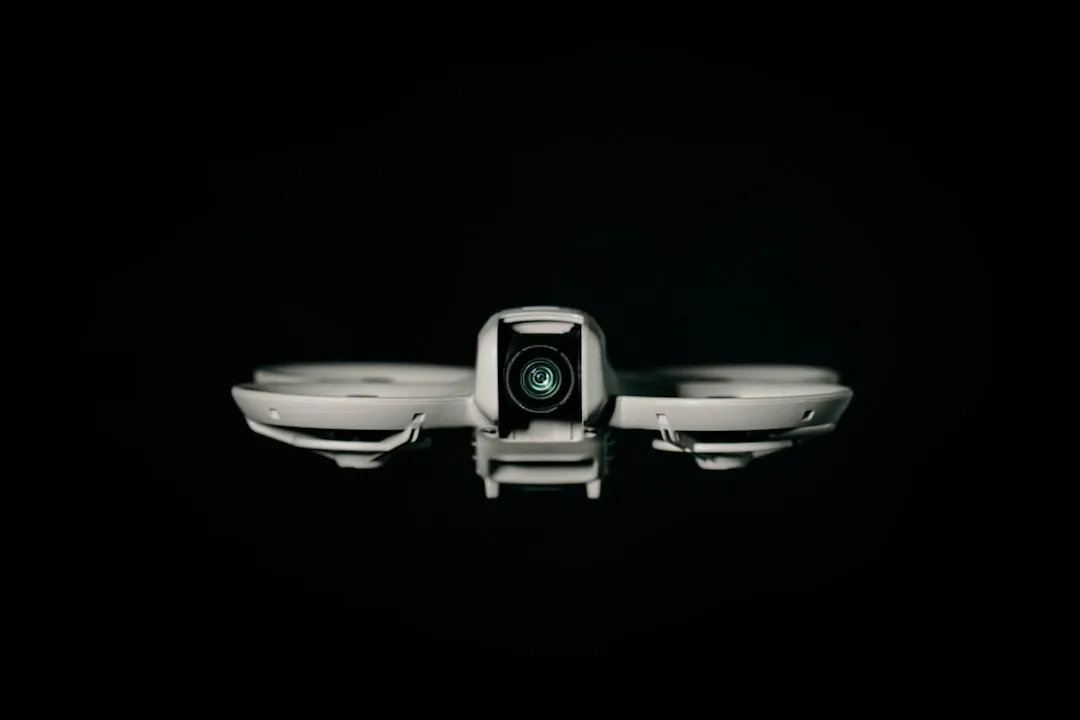
DJI Neo 2 Is Now the Most Apple-Friendly Drone Ever
DJI just dropped something that's going to make drone flying feel like we're living in the future—and honestly, it's about time. With a brand-new firmware update, the DJI Neo 2 now supports Apple Watch remote control, letting you steer, track, record, and manage your drone right from your wrist. While DJI's latest Fly app update brings Apple Watch support to three of DJI's most portable, controller-free drones: DJI Neo 2, DJI Flip, and DJI Neo, it's the Neo 2 that truly shines as the most Apple-integrated drone experience we've ever seen.
Here's what makes this so compelling: the watch acts as an extension of the app—a wearable status display and voice-command relay—not a standalone flight controller. But when you combine this with the Neo 2's advanced capabilities, you get something that feels like genuine Apple ecosystem integration rather than just another accessory.
Why Neo 2 Leads the Apple Integration Race
Let's break down what makes the Neo 2 the clear winner in Apple-friendly features. Neo 2 has already received its firmware update to activate Apple Watch functionality, while firmware updates for Flip and Neo are expected soon. Being first to market with full functionality is just the beginning.
The real advantage lies in how the Neo 2's advanced sensor suite works seamlessly with Apple Watch control. The Neo 2 uses omnidirectional obstacle sensing plus a forward-facing LiDAR and visual sensors to improve obstacle awareness. This means you can confidently issue voice commands through your Apple Watch without worrying about crashes—the drone's intelligence handles the safety while your watch handles the commands.
What really sets the Neo 2 apart is its comprehensive control options. The Neo 2 supports gesture control, voice commands, smartphone flying, and motion controllers. Having voice command capability through your Apple Watch means you can literally tell your drone what to do while keeping your hands free—perfect for cycling, hiking, or any activity where you want aerial footage without fumbling with devices.
How Apple Watch Control Actually Works
The technical implementation is more sophisticated than you might expect. The DJI Fly app must be running on both your smartphone and your Apple Watch, and your smartphone must be connected to the drone for the Apple Watch support to work. So no, you can't ditch your phone entirely—but that's actually a good thing for reliability and processing power.
What you get with this setup transforms the drone flying experience. Flying with your smartwatch as a secondary interface allows for real-time video feed, battery level display, voice commands, and status monitoring while your phone stays in your pocket. Imagine being out on a bike ride and being able to check your drone's battery life, switch flight modes, or give it voice commands without stopping or reaching for your phone.
The Apple Watch becomes your mission control center—giving you instant access to critical flight data and control functions while your phone handles the heavy computational lifting in the background.
Neo 2's Apple-Advantage Features
Advanced Intelligence Meets Seamless Control
The DJI Neo 2 is built for everyday creators, is tiny, quick to deploy, and loaded with sensors far more advanced than on something this small. This intelligence is what makes Apple Watch control practical rather than gimmicky. The drone can handle complex flight maneuvers and obstacle avoidance while you focus on creative direction through simple wrist-based commands.
The obstacle avoidance system is particularly impressive when paired with Apple Watch control. The Neo 2 supports omnidirectional obstacle sensing, LiDAR, and visual sensors help it understand its surroundings in a 360-degree bubble. This means you can confidently use voice commands through your watch without constantly monitoring for obstacles—the drone handles spatial awareness automatically.
Storage and Performance Built for Apple Users
Internal storage has been increased from 22 to 49 GB, enough to record up to 105 minutes of video in 4K 60 fps or 175 minutes in 4K 30 fps. This massive storage upgrade is perfect for Apple users who expect their devices to work seamlessly without constant file management. You can shoot extensively and transfer content to your iPhone or Mac later via the enhanced Wi-Fi connection.
The performance specs align perfectly with Apple's quality standards too. The Neo 2 can shoot at 4K resolution at 60fps and 100fps (slow-motion), delivering content that looks great whether you're sharing on social media or editing in Final Cut Pro.
Ecosystem Integration That Actually Works
The weight of the Neo 2 remains under the 250-gram limit, classifying it in the most permissive European category (C0). This regulatory advantage means Apple users can fly almost anywhere without complex registration requirements—the kind of seamless experience Apple customers expect from their tech ecosystem.
Beyond the Competition: Why Neo 2 Stands Alone
While the original Neo and DJI Flip will eventually get Apple Watch support, the Neo 2's hardware advantages make it the superior choice for Apple users. The DJI Neo is the OG palm-sized selfie drone, supporting palm takeoff and landing, gesture flying, voice controls, and smartphone-only flight, but it lacks the advanced sensing and processing power that makes Apple Watch control truly practical.
The DJI Flip is a foldable, pocketable camera drone with a 1/1.3-inch sensor, 48 MP stills, and 4K HDR video at 60 fps. While the Flip offers superior camera specs, it's designed more as a traditional camera drone rather than the seamless, always-ready companion that Apple users prefer.
The Neo 2 strikes the perfect balance: sophisticated enough to deliver professional results, yet simple enough to integrate naturally into your Apple ecosystem workflow.
The Apple User Experience Advantage
Apple Watch support enhances the convenience of monitoring and commanding drones, especially for users who prioritize portability and minimal setups. But the Neo 2 takes this further by eliminating the barriers that typically exist between idea and execution.
Want to capture your morning run? Launch the Neo 2 from your palm, start recording with a voice command to your Apple Watch, and let the drone follow you automatically while you focus on your workout. The combination of palm takeoff, advanced tracking, and wrist-based control creates an experience that feels magical—exactly what Apple users have come to expect from their devices.
The hands-free aspect is transformative for active Apple users. Whether you're hiking with an iPhone in your backpack, cycling with your hands on the handlebars, or simply want to keep your expensive phone protected while your drone is flying, being able to check status and issue commands from your Apple Watch removes every friction point from aerial content creation.
What This Means for the Future
DJI has made flying a drone feel a whole lot more futuristic. More importantly, they've created the first drone that truly feels like it belongs in the Apple ecosystem. The Neo 2 doesn't just connect to Apple devices—it enhances them.
This integration represents a broader shift toward making advanced technology invisible and intuitive. When you can control a 4K-capable flying camera from your wrist using voice commands, while advanced AI handles safety and tracking automatically, we're definitely living in the future that Apple has been promising for years.
For Apple users specifically, the Neo 2 offers something unique: a drone that works the way Apple products work. It's intelligent enough to handle complexity automatically, simple enough to use without thinking about it, and integrated enough to feel like a natural extension of your existing devices rather than another gadget to manage.
The question isn't whether other drone manufacturers will follow suit—it's how quickly they can catch up to what DJI has achieved with the Neo 2's Apple integration. Until then, if you're an Apple user looking for the most seamless drone experience possible, the Neo 2 isn't just the best option—it's the only option that truly gets the Apple ecosystem right.
















Comments
Be the first, drop a comment!