




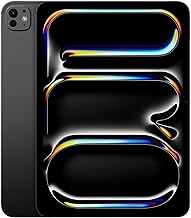

When you think about ditching your Mac for an iPad-centric workflow, it sounds like a pipe dream—until you see Wesley Hilliard's setup in action. Wesley has returned to being a full-time iPad Pro user, proving that the M4 iPad Pro can genuinely replace traditional desktop computing. His workflow demonstrates how modern iPads have evolved beyond simple tablets into legitimate computing powerhouses that can anchor an entire professional workspace.
Here's what makes this transformation so compelling: we're not talking about compromising anymore. Apple's iPadOS 26 makes the experience feel even more laptop-like, while the M4 iPad Pro represents Apple's best take on the naked robotic core to date. Wesley's approach builds a complete ecosystem that doesn't just replace a Mac mini—it surpasses it in versatility and portability, addressing the thermal management and battery considerations that have traditionally limited iPad Pro workflows.
How the M4 iPad Pro became a desktop powerhouse
The foundation of Wesley's setup revolves around the M4 iPad Pro's remarkable ability to function as both a portable and stationary computer. The iPad Pro can be attached to a Thunderbolt cable and used as a desktop computer with a 27-inch 5K monitor, creating a seamless transition between mobile and desktop workflows. This flexibility represents a fundamental shift in how we think about computing devices.
The hardware's inherent versatility extends beyond traditional productivity tasks. The iPad Pro can be used to stream from a Nintendo Switch or PlayStation 5 to the Studio Display, transforming what could be seen as entertainment capabilities into proof of the system's media processing versatility—the same video processing power that handles gaming streams also accelerates professional video editing and content creation workflows.
The connectivity magic happens through smart peripheral choices. A StarTech Thunderbolt 4 dock is used to connect the iPad Pro to various accessories, creating a hub that rivals any desktop setup in terms of connectivity and functionality. This single dock transforms the iPad from a portable tablet into a full desktop experience with just one cable connection—addressing one of the key workflow friction points that previously made iPad setups cumbersome.
PRO TIP: While the body of the iPad Pro tends to get warm faster than the M2 MacBook Air during intensive tasks, the external display connection helps distribute thermal load, and Apple plans to improve thermal management with a vapor chamber on future models.
The physical workspace itself reflects this multi-purpose philosophy. The desk setup includes an Uplift L-shaped desk, a Flexispot standing desk, and a C7 chair, providing the ergonomic foundation needed for extended work sessions while maintaining the flexibility to adapt to different tasks throughout the day.
The software revolution that made it possible
iPadOS 26 represents the turning point that finally made Mac replacement workflows viable. iPadOS 26 checks nearly every box in improving the iPad platform, addressing years of user frustrations with professional iPad computing.
A headline feature of iPadOS 26 is windowing mode, which lets you stack your open apps, bringing desktop-class multitasking to the tablet form factor. The multitasking improvements go beyond simple window management. You can make the app any size you want and put it anywhere on the screen, while once you've resized an app, that is now the size and placement of that app. This persistent window management creates a truly desktop-like experience that remembers your preferences and adapts to your workflow patterns—something that becomes crucial when switching between portable and docked modes throughout the day.
Professional tools have also received significant upgrades that transform fundamental workflow bottlenecks. The Files app has been rebuilt with more user customization and control in iPadOS 26, while Preview app has been added to iPadOS 26, eliminating the need for some specific file type apps. These improvements specifically address the file management and document handling workflows that previously forced users back to traditional computers for basic professional tasks.
The menu bar implementation deserves special attention. The addition of the menu bar is a huge win for productivity, and if you connect your iPad to an external monitor, you can see it automatically when an app opens, no need to hover the mouse at the top. This enhancement specifically benefits external display workflows like Wesley's setup.
Where the Mac mini fits into an iPad-first world
Wesley's approach demonstrates practical wisdom about tool selection by strategically repositioning rather than eliminating the Mac. The Mac mini lives in a bookshelf in the office, serving specific purposes rather than acting as the primary computing device. The the Mac mini exists mainly for recording podcasts, handling tasks that benefit from macOS-specific software or hardware configurations.
This hybrid approach recognizes that certain workflows still benefit from traditional desktop computing while keeping the iPad Pro as the central productivity hub. The author uses a Magic Mouse and an Apple Watch to wake the Mac mini, maintaining seamless integration within the Apple ecosystem. When the Mac mini needs to come out of the bookshelf for extended use, a portable monitor is used for the Mac mini when needed, ensuring flexibility without sacrificing desk space or visual real estate.
The beauty of this arrangement lies in treating each device as a specialized instrument rather than forcing a single device to handle every conceivable task. The Mac mini becomes a dedicated tool for specific workflows—like podcasting with professional audio software—rather than serving as the default choice for everything. This approach maximizes the strengths of both platforms while minimizing their respective limitations.
Multi-device ecosystem and workflow optimization
Wesley's approach extends beyond just the iPad Pro and Mac mini to encompass a carefully curated ecosystem of devices that amplifies overall productivity. The author has an iPad mini 7, which is considered the best iPad-as-a-tablet in its lineup, serving as both a personal computer and second display. This multi-iPad approach maximizes screen real estate while maintaining the unique benefits of touch-first interfaces across different form factors.
The device specialization creates natural workflow divisions: the iPad Pro handles the heavy lifting—professional apps, external display connection, and primary productivity tasks—while the iPad mini 7 provides additional screen real estate and handles more casual computing tasks that benefit from the tablet form factor. This division addresses the external display connectivity issues that some users experience, providing backup display options and workflow flexibility.
The iPhone plays a crucial role in content creation workflows. The author uses the iPhone 16 Pro Max as a core device for photography and video recording, with photos for the author's work outside the house taken with the iPhone. This integration demonstrates how modern workflows seamlessly blend capture, editing, and publishing across multiple devices without traditional file management headaches—the content moves naturally through the ecosystem from iPhone capture to iPad editing to final publishing.
Apple Vision Pro adds spatial computing capabilities to the workflow mix. Apple Vision Pro was released in February and initially became the primary computer for the author, but the author wears Apple Vision Pro a few times a week, sometimes for hours, but it isn't the primary machine. This evolution illustrates how emerging technologies naturally find their optimal role within established workflows rather than displacing everything else—the Vision Pro handles specific spatial computing and immersive work sessions that complement rather than compete with the iPad Pro's strengths.
The future of iPad-centric computing
Wesley's setup represents more than just a personal preference—it signals a broader shift toward flexible, ecosystem-based computing approaches. The author's office is in flux and constantly being tweaked, reflecting the dynamic nature of modern work environments and the need for adaptable technology solutions. This constant evolution isn't a limitation—it's a feature of truly flexible computing setups that can adapt as work demands change.
The forward-thinking aspects extend beyond current capabilities. The author is considering making the Mac mini portable using an external battery pack, demonstrating how even traditionally stationary computing components can be reimagined for greater flexibility. This portable Mac mini concept could address the battery life considerations that currently limit extended iPad Pro sessions away from power sources.
The broader adoption trends support Wesley's approach as increasingly mainstream. More people are moving to an iPad-first or iPad-only computing life, making it finally possible, while it is very comfortable to live in 2024 with an iPad Pro as the main computer for general tasks. The technology has matured to support serious professional workflows, though users should be aware that the iPad Pro's battery life is shorter than that of the MacBook Air M2, and the battery will deteriorate over time.
Bottom line: Wesley's iPad-centric workflow demonstrates that the future of computing isn't about choosing between different platforms—it's about building ecosystems that amplify your productivity while maintaining the flexibility to adapt as your needs change. The key insight isn't that iPads are universally better than Macs, but that the most effective computing setup might involve multiple specialized devices working together, each handling the tasks they excel at rather than forcing one device to do everything.
















Comments
Be the first, drop a comment!