



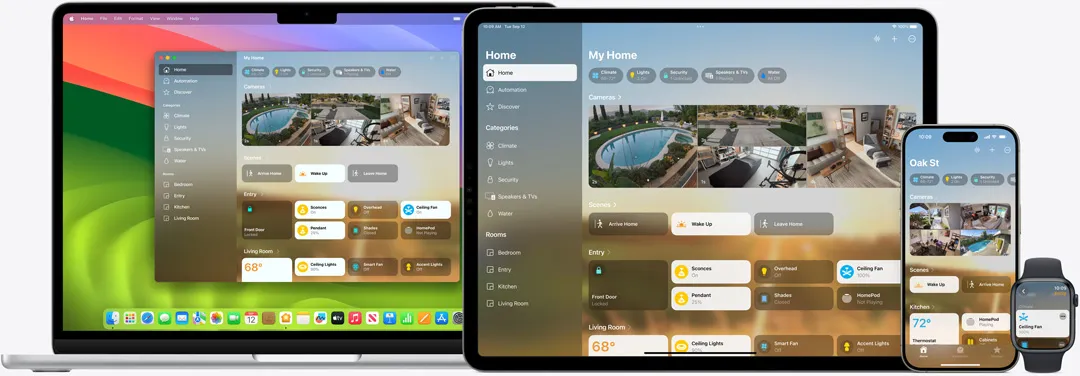
Apple's long-rumored Home Hub display is shaping up to be less a single shared screen and more a device that can serve personal content depending on who's using it.
Code strings found in the macOS Tahoe 26.7 release candidate describe a "Personal Content" system built around user profiles, manual selection through Control Center, and camera-paired "ambient sensing" meant to verify identity, according to MacRumors.
That's the core of what's being called Apple Home Hub face-based profile switching, though the strings themselves stop short of confirming Face ID or proving that switching happens automatically.
What the code shows directly is camera-assisted identity verification, not confirmed Face ID in the biometric sense. Separate reporting now goes further: Bloomberg's Mark Gurman said the hub will use facial recognition to identify who is standing in front of it and serve personalized content for that person, according to MacRumors.
Face ID specifically still traces back to separate reporting on an internal Apple build rather than the newly surfaced macOS strings.
Inside the Personal Content and profile-selection system
The setup path starts in the Settings app. Users enable Personal Content by tapping their own name and switching the feature on, though the code doesn't indicate whether it will ship active by default.
Once turned on, the surfaced strings show that users can select a profile through the device's Control Center. They also include a failure state instructing an unidentified user to select themselves in Control Center before accessing Personal Content.
A separate discovery from August 18 fills in more of the interface. Code found in macOS 26.7 referenced customizable home-screen "Faces," a Face Gallery, and Smart Stacks that rotate widgets throughout the day, according to Engadget.
That suggests personalization is central to the design, though it doesn't establish that each Face maps to one specific person. The term appears closer to Apple Watch-style home-screen layouts than household user profiles.
What Apple Home Hub face-based profile switching code confirms
Some pieces of the identity system are stated plainly.
The strings tie ambient sensing directly to camera-based verification. One asks an unidentified speaker to "come in front of this device and ask again," while another says a user who hasn't been seen in a while must return in front of the camera before retrying.
A separate string links manual profile selection with temporarily allowing ambient sensing to verify identity. That wording suggests at least some identity checks involve explicit, temporary permission rather than unrestricted sensing.
The iPhone plays a role too, though a more limited one than the cameras. Code from the same macOS release suggests the hub can detect whether a user's iPhone is nearby before displaying personal information inside widgets.
Nothing in that discovery establishes iPhone proximity as an identity check equivalent to the camera. It appears instead to be a supporting privacy signal controlling whether sensitive widget information appears.
The newly surfaced strings alone don't establish whether the hub automatically switches profiles as someone approaches.
Separate reporting does. Gurman reiterated on August 25 that the device will use facial recognition to determine who is standing in front of it and serve personalized content for that individual. That is stronger evidence for automatic personalization, but it comes from reporting about Apple's plans rather than from the Personal Content strings themselves.
Face ID remains less certain. Macworld reported in December 2025 that an internal iOS 26 build referenced Face ID and facial biometrics for authentication and multi-user profile switching, along with an internal app used to test recognition accuracy.
Gurman's newer reporting describes facial recognition, but doesn't specifically call the system Face ID. Until Apple announces the product, those two terms shouldn't be treated as interchangeable.
What this could look like in a household
Taken together, the code establishes manual profile selection plus camera-assisted identity checks. Separate reporting suggests the hub can also recognize the person in front of it and automatically serve personalized content.
The failure states say almost as much as the successful ones. If the device isn't confident about who's speaking, it can ask the person to move in front of the camera. If enough time has passed since the previous visual check, it can require another camera verification.
iPhone proximity adds another layer by helping determine whether personal information should appear in widgets.
The surfaced strings don't explain what happens when more than one person is standing nearby, when a guest approaches, or when a child tries to access another household member's Personal Content.
How Apple handles those cases remains open.
A privacy precedent, and its limits
Apple already ships face recognition elsewhere in its smart-home ecosystem.
With a compatible HomeKit Secure Video camera or doorbell, the Home app can identify familiar people using faces from a user's photo library or images captured from previous camera visits, according to Apple's support documentation.
That gives Apple an existing technical precedent for recognizing household members, but it doesn't establish that the Home Hub will use the same system.
The privacy architecture is also more nuanced than saying nothing leaves the home. Apple says HomeKit Secure Video analyzes camera footage locally on the Home Hub before encrypting recordings and uploading them to iCloud.
Apple's platform security documentation says face-classification data is stored in CloudKit using end-to-end encryption. Encrypted video and associated metadata can also be stored on Apple's servers, but Apple can't read the protected content.
HomeKit Secure Video requires an iCloud+ subscription.
That's a useful precedent for how Apple could handle camera-based identity privately, but the current Home Hub code doesn't confirm that its Personal Content or ambient-sensing system uses HomeKit Secure Video's architecture.
The existing Home face-recognition feature has limits too. People can remain unidentified and need to be named manually, and recognition depends on what the camera can actually see.
Whether the Home Hub faces the same limitations or uses a separate system hasn't been tested publicly.
Two Home Hub versions are still in development
The hardware itself is coming into clearer focus.
The macOS 26.7 code includes identifiers for two apparent variants: J490, associated with the speaker-base model, and J491, associated with a wall-mounted version. Related strings include "HomeAccessory" and "HomeAccessory_wall."
The same software leak also references the Widget Gallery, Face Gallery, Smart Stacks, and other interface components, adding to the evidence that both configurations remain under active development.
Earlier launch windows have repeatedly moved. Macworld's December 2025 report pointed to spring 2026, a window that passed without a launch.
More recent reporting has narrowed the timing again. Gurman reported in July that the hub was expected between October 2026 and early 2027, but on August 25 he said Apple remains on track to release its first smart-home device with a screen before the end of 2026.
Apple itself still hasn't announced the Home Hub or given it a launch date.
What's still unresolved
The macOS 26.7 strings show Apple building Personal Content, Control Center profile selection, camera-assisted identity verification, and ambient sensing into one shared-home system.
Nearby iPhone detection appears to help determine whether personal information is shown in widgets rather than acting as a replacement for camera verification.
Separate reporting now strengthens the case that facial recognition will also drive automatic personalization, but Apple has not confirmed the specific use of Face ID.
A handful of questions remain open: whether users can disable ambient sensing entirely, exactly what Personal Content includes, how multiple people in front of the hub are handled, and how much camera-based identification happens automatically versus after an explicit profile selection.
Apple's HomeKit Secure Video architecture shows that the company already has an established model for local video analysis combined with end-to-end encrypted cloud storage. Nothing found in the Home Hub code yet confirms that the new device will use the same privacy design.
The product is now reported to be on track for release before the end of 2026. Until Apple actually announces it, however, the distinction remains important: the leaked code shows how identity verification is being built, while facial recognition, Face ID, and automatic profile behavior come from separate reporting about Apple's broader plans.















Comments
Be the first, drop a comment!