




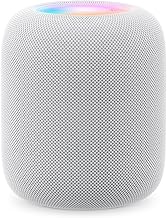
HomePod Lock Controls: What iOS 27.2 Disables and Allows
Apple is testing a new HomePod Lock Controls setting in the Home app that shuts off touch input on the speaker's top surface, according to a report published yesterday by Apfelpatient. The toggle currently appears in the iOS 27.2 Release Candidate alongside matching HomePod 27.2 software, and once switched on, it stops the touch panel from registering play, pause, skip, or other gestures.
This is still pre-release software, not a finished feature sitting in everyone's Home app yet. The setting only shows up once both the iPhone and the HomePod itself are updated to version 27.2, per Apfelpatient, and several core functions, including alarms, timers, and FaceTime, reportedly keep responding to touch even with the lock enabled.
A leaker who examined the HomePod 27.2 Release Candidate reported that Lock Controls reaches every HomePod model, including the original 2018 unit, a claim both Apfelpatient and Mac Life cite. Apple hasn't published anything confirming that model list or the feature's final release-note wording.
What HomePod Lock Controls actually disables
Apple's own in-app description, still present in the Release Candidate build, states that touching the top of the HomePod will no longer start playback or trigger any other action once Lock Controls is turned on, Apfelpatient reports. That covers the gestures people run into by accident most often: starting, pausing, and skipping tracks when curious kids' hands or a wandering pet catch the top panel, per the same report.
That's a different approach from what Apple already ships. Until this point, Apple only let users adjust how the touch surface responded, not disable it outright, per Apfelpatient. The existing Touch Accommodations setting lets someone require up to a four-second hold before a touch registers, but shorter touches still work once that threshold passes, according to the same report. A separate Touch and Hold for Siri switch only stops the assistant from activating by touch and leaves playback gestures untouched.
Lock Controls doesn't delay or filter input the way those two settings do. It takes top-surface control out of the equation entirely for the gestures it covers, which is why it reads as a dedicated fix for accidental playback rather than a repurposed accessibility option.
Why Apple appears to be adding this now
Neither Apple's in-app copy nor the beta materials spell out an official reason for Lock Controls. The justification comes from the outlets covering it: Mac Life describes the setting as a response to accidental taps from kids and pets, plus so-called phantom touches, where the speaker registers input even though nothing touched the surface. Apfelpatient frames the same fix around curious children's hands interrupting playback.
None of the reporting reviewed here quantifies how often phantom touches or accidental taps actually happen on HomePod units in everyday use. The case for Lock Controls rests on commonly described annoyances rather than cited frequency data, so "why now" is worth treating as a reasonable inference, not something Apple has stated outright.
What still responds to touch when HomePod Lock Controls is on
Lock Controls isn't a blanket shutdown of the touch surface. Apfelpatient and Mac Life both report that five categories stay touch-responsive even with the setting enabled: Intercom and announcements, timers, alarms, Check In, and FaceTime calls.
The alarm exception has an obvious everyday payoff. People who tap the top of their HomePod to silence a morning alarm reportedly won't need to change that habit once Lock Controls ships, per Apfelpatient.
What's missing from current reporting is any mention of how Siri voice commands behave once the lock is active, or whether a tap and a hold produce different results within those five exceptions. Neither outlet covering the Release Candidate build has addressed it directly. Anyone testing it should treat Siri's status, and the finer mechanics of each exception, as unconfirmed until Apple's release notes catch up.
How to enable HomePod Lock Controls, and which models support it
The toggle only shows up in the Home app once both halves of the pairing are current: an iPhone on iOS 27.2 and a HomePod running HomePod software 27.2. Updating just one side isn't enough, according to Apfelpatient.
Once both are updated, turning it on is simple: long-press the HomePod tile in the Home app, tap the gear icon, and look for Lock Controls among the device settings.
Model support is the biggest open question. A leaker who goes by pdfu examined the HomePod 27.2 Release Candidate and found that Lock Controls works across every HomePod model, including the original 2018 HomePod, a finding both Apfelpatient and Mac Life cite. A Release Candidate build represents the version Apple intends to actually ship, per Apfelpatient, which gives the finding more weight than a typical beta leak, but it's still code analysis rather than a compatibility list Apple has published itself.
Final versions of iOS 27.2 and HomePod 27.2 are expected the week of October 26, according to Mac Life. That timeline would land just days ahead of the HomePod mini 2's October 30 launch, per Apfelpatient.
What to check before you rely on it
If the iOS 27.2 Release Candidate is already installed on both the iPhone and the HomePod, the Lock Controls toggle should be visible now in the Home app's device settings. Test it directly rather than assuming the described exceptions behave identically on a particular speaker.
Anyone not running the RC should wait for the public release expected the week of October 26 and check Apple's official release notes at that point for confirmed model support. The all-models claim circulating right now traces back to a leaker's code analysis, not an Apple statement.
Before trusting Lock Controls around kids or pets, confirm which of the five exceptions actually hold on the installed hardware. Siri's behavior under the lock hasn't been reported on at all, so don't treat voice commands as a guaranteed workaround until someone's actually tested it.









Comments
Be the first, drop a comment!