





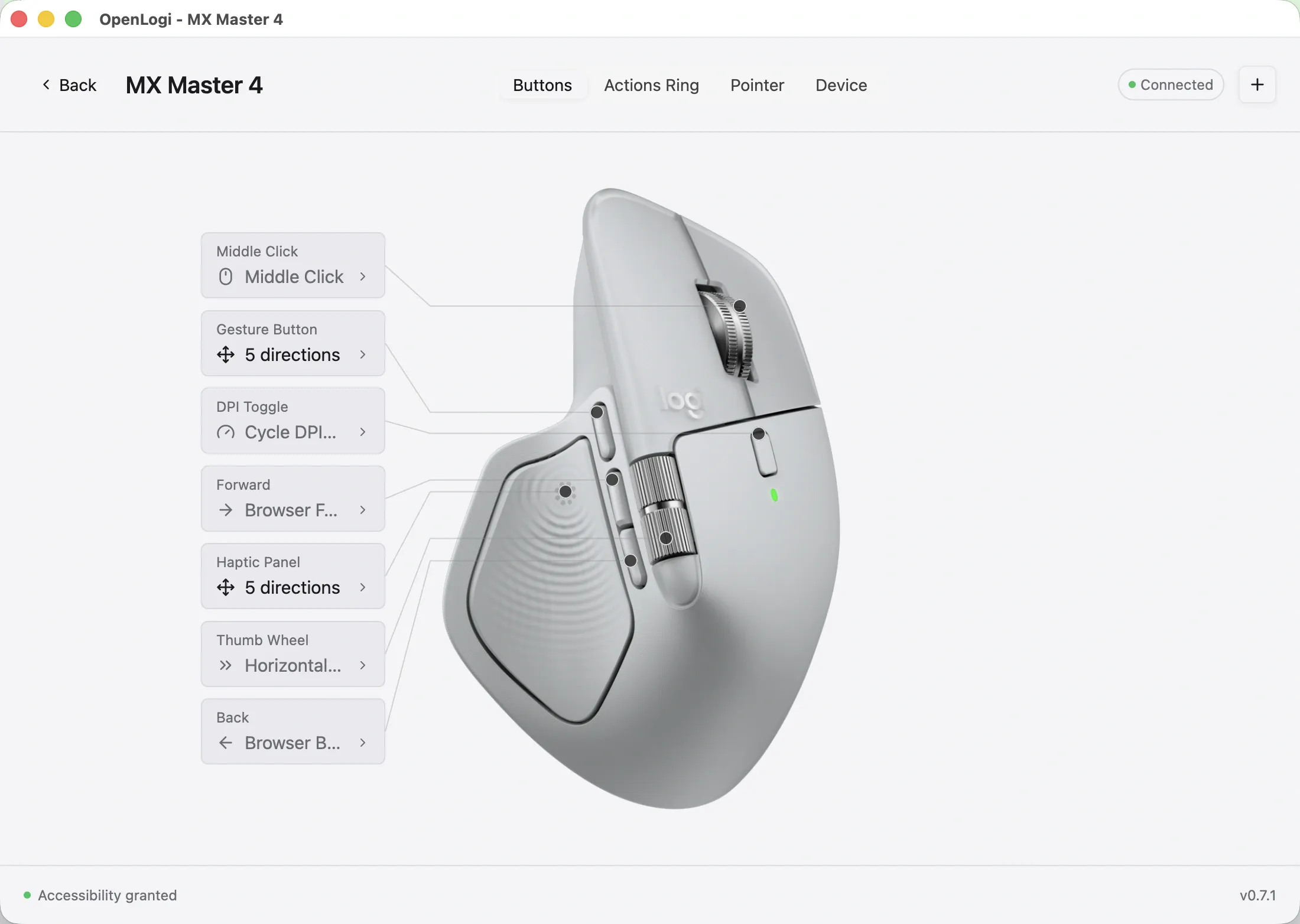
A Rust-based open-source project called OpenLogi is drawing attention as a telemetry-free alternative to Logitech Options+, the configuration app most Logitech mouse owners already have installed. OpenLogi runs on macOS 13 or later, Windows, and Linux, and the project's own documentation confirms support for button remapping, DPI adjustment, and SmartShift configuration, all without requiring a Logitech account.
Mac owners can install OpenLogi today. It is not a finished product, though. The project's own roadmap calls it "under active development and not yet stable" at its current v0.8.15 release, dated October 20, and the available documentation stops short of listing which specific Logitech mouse and keyboard models it supports. What follows separates what the documentation confirms as working from what it doesn't, and what macOS specifically requires to get it running.
Is OpenLogi a Logitech Options+ alternative for Mac?
OpenLogi bills itself on GitHub as "a native, local-first alternative to Logitech Options+, written in Rust" that remaps buttons, DPI, and SmartShift over the HID++ protocol Logitech devices use, with no account and no telemetry. The project's tagline is blunter: "Fed up with Options+? Try OpenLogi."
Created in May 2026, the repository had approximately 24,300 stars, 856 forks, and 364 open issues when checked on October 27. GitHub lists both Apache 2.0 and MIT licenses for the project
On the functional side, the documentation confirms a specific set of working controls: button remapping, DPI adjustment, and SmartShift configuration over HID++, plus Fn-lock and report-rate controls, with Easy-Switch channel visibility shown in the desktop app.
Where OpenLogi falls short of Logi Options+
OpenLogi supports per-app profiles that automatically switch mouse settings based on the active application, according to its official roadmap. On macOS, Windows, and X11, profiles follow the application under the pointer; other supported sessions use the focused application. OpenLogi also displays Easy-Switch channels and allows users to rename them on devices that support the feature, though its documentation does not establish whether channel names update automatically.
The no-telemetry claim needs a sharper look. OpenLogi advertises no account and no telemetry, but its usage documentation notes that asset synchronization can contact assets.openlogi.org, a Cloudflare-hosted endpoint. The documentation doesn't establish that this request qualifies as telemetry or specify what data it carries, so it's worth reviewing that sync behavior rather than assuming the app makes zero network contact. Two documented options, the OPENLOGI_ASSETS environment variable and the --base flag, let users point that sync at a different host, though neither is described as a privacy guarantee, just a configuration choice.
OpenLogi's JSON automation API distinguishes between setting a value and saving it to the configuration file. Its documented --save option persists supported changes to config.toml, but that API-specific behavior should not be treated as a description of every setting in the desktop application.
The documentation describes this save-and-verify behavior for the command-line interface specifically; it does not confirm whether the desktop GUI follows the same workflow or handles persistence automatically, so treat it as a CLI-specific detail for now.
Then there's the compatibility question the documentation simply doesn't answer. Neither the GitHub repository, the installation docs, nor the usage guide includes a model-by-model list of supported Logitech mice or keyboards. That absence in the supplied documentation isn't proof that uncommon devices fail, but it does mean anyone with an older or less common Logitech model should check the project's issue tracker for their hardware before relying on OpenLogi daily.
On the open-issue count: without triage status, severity, or age attached to that number, 559 open issues doesn't indicate how buggy the software is one way or the other. It mostly echoes what the roadmap already states directly: that this is pre-1.0 software.
Setting up OpenLogi for macOS
Mac users can install OpenLogi through the official Homebrew cask, and the project says its release DMG is signed and notarized. After launching the app, macOS prompts for two permissions that matter for mouse configuration: Accessibility, which enables gesture and button remapping, and Input Monitoring, which reads the HID++ data OpenLogi needs, including from Bluetooth-direct mice. A third permission, Camera, only applies to previewing a Logitech webcam through the app and has nothing to do with mouse settings; it can be skipped.
Installing OpenLogi without immediately removing Logi Options+ is a reasonable way to test it, but only one application can own a Logitech receiver at a time, so Logi Options+ needs to be fully quit before OpenLogi will connect to a receiver-based device. On Linux, the same rule applies to Solaar.
Updates on macOS come through Sparkle, a framework added to the app bundle in version 0.8.14, or through brew upgrade for anyone who installed via Homebrew.
Windows and Linux are also supported
OpenLogi is not Mac-only. Windows users get a signed per-user MSI installer or a portable ZIP, both covering x86_64 and arm64; the MSI installs without administrator elevation and updates in-app through Settings → Updates, though the portable ZIP has no documented in-app update path. Linux installs rely on udev rules bundled with the release packages that grant device access without sudo if access is still denied after installation, the documented fix is unplugging and reconnecting the receiver or mouse.
Install it, but don't delete Logi Options+ yet
For Mac owners whose needs stop at button remapping, DPI control, and SmartShift adjustment, OpenLogi is available to test now, and the documented feature set covers that ground without a Logitech account. Install it alongside Logi Options+ rather than replacing it outright: quit Logi Options+ first so OpenLogi can take over the receiver, then confirm the specific controls needed actually behave as expected on the hardware in use.
OpenLogi already supports per-app profiles and Easy-Switch channel renaming on compatible devices, but its documentation does not establish feature parity with Logi Options+ across every Logitech model. Owners of uncommon devices should verify compatibility before switching. Because the roadmap warns that features and configuration may still change, keeping Logi Options+ installed until the required controls have been tested remains the safer approach.



Comments
Be the first, drop a comment!