



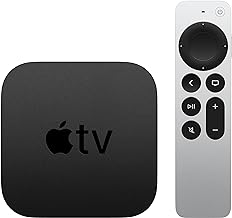



Apple lists Apple TV HD and Apple TV 4K among the compatible devices for its current remotes, but the compatibility entries hinge on the tvOS version, not just the device name. That distinction is the whole ballgame for anyone trying to sort out Siri Remote compatibility with older Apple TV hardware before spending money.
The people who need this answer are owners still running an Apple TV HD or a first-generation Apple TV 4K with the original thin remote. Apple's documentation confirms which remote shipped with which box and specifies the minimum tvOS version required for each of the three Siri Remote generations.
Identify your remote and Apple TV model first
Apple's support page is clear on shipping history. The clickpad-style remote sold today shipped with Apple TV 4K second generation and later, while an earlier, thinner remote design shipped with Apple TV 4K first generation and Apple TV HD.
Naming adds a wrinkle that trips up anyone searching for the right accessory. In countries and regions where Siri works, Apple calls the remote Siri Remote; everywhere else, it's labeled Apple TV Remote. That split explains why searches for Siri Remote compatibility and Apple TV Remote compatibility turn up the same hardware questions: the two names describe the same hardware, not separate compatibility tiers. Siri functionality depends on the Apple TV's configured language and country or region.
The physical giveaway is the charging port. Lightning shows up on both the original thin remote and the earlier clickpad remote, while USB-C arrived with the 2022 and later clickpad version, according to MacRumors' hands-on review of the hardware. Before shopping, confirm which port is on the remote currently in hand and which box it's paired with. The model name "Apple TV 4K" alone won't tell you that, since Apple has reused it across multiple hardware generations.
What the tvOS compatibility tiers do and don't confirm
Apple's remote-identification page lists three separate compatibility entries for "Apple TV 4K and Apple TV HD": one requiring tvOS 15.4 or later, one requiring tvOS 14.5 or later, and one with no stated software minimum at all.
Apple identifies the software requirement for each remote generation. The third-generation Siri Remote requires tvOS 15.4 or later, the second-generation model requires tvOS 14.5 or later, and the first-generation model has no stated minimum. All three list compatibility with Apple TV 4K and Apple TV HD.
The workable check is to look at the tvOS version currently installed on the older box in Settings, then compare that against the tvOS requirement listed for the specific remote model being considered, instead of assuming the general "Apple TV 4K and Apple TV HD" language applies the same way across every remote sold. Apple's U.S. Store lists the Siri Remote at $59, although buyers should confirm the current price and availability in their region before ordering.
Does the new Siri Remote work with older Apple TV models
For owners still holding the original thin remote, the upgrade case has some real substance, based on one detailed review. The Verge described the clickpad remote as "ergonomic and easy to use" in a review excerpted by MacRumors, noting its rotational scrubbing gesture as an alternative to fast-forwarding and rewinding on the older remote.
That's one reviewer's hands-on impression, not a controlled comparison test, but it's a useful data point to weigh against the cost of buying new hardware.
Owners already running a prior-generation clickpad remote get a smaller payoff. MacRumors found the current USB-C version "identical to the prior generation" apart from the charging port, which means that swap is mainly a cable change rather than a functional upgrade.
Losing the remote remains unsolved either way. The same reviewer said the current remote still lacks a U1 chip for precision tracking and has no built-in speaker for a "find my remote" voice command, listing both as wishes for a future version rather than confirmed gaps across every unit sold.
What a new remote won't fix on an older Apple TV box
A remote swap doesn't touch HDR10+ playback, storage capacity, or Ethernet and Thread networking. Those are specifications tied to the Apple TV box, not the remote. The 2022 Apple TV 4K added HDR10+ support, an A15 Bionic chip, 4GB of memory, and a slimmer fanless design compared with the prior generation.
At its November 2022 launch, that model started at $129 for a 64GB Wi-Fi-only configuration, with a $149 tier adding 128GB of storage, Ethernet, and Thread support. Those are launch-era figures from four years ago, not current pricing, so check Apple's store listing directly before weighing a box replacement against a simple remote purchase.
Whether the extra horsepower is noticeable day to day depends heavily on what the box gets used for. TechCrunch reviewer Darrell Etherington said a six-year-old first-generation Apple TV 4K was hard to distinguish from a 2021 model in normal use, according to an excerpt published by MacRumors. That's a single tester's experience, not a benchmark, so it doesn't prove any particular older box is holding someone back. Heavy Apple Arcade or App Store gaming is the scenario where the difference is most likely to show up.
Which remote or box actually fits your setup
Apple TV HD or first-generation Apple TV 4K with original thin remote: MacRumors found the clickpad gesture faster for scrubbing video. Before buying, check the remote listing's stated tvOS requirement against the version installed on your Apple TV.
2021 Apple TV 4K with prior-generation clickpad remote: MacRumors found the current remote identical apart from the charging port. Likely not worth replacing unless the Lightning port has failed.
Any Apple TV box needing HDR10+, Ethernet, Thread, or more storage: These are Apple TV box specifications, not remote features. Check current Apple Store listings for pricing, as 2022 launch prices are outdated.
Apple confirms that all three Siri Remote generations are compatible with Apple TV HD and Apple TV 4K, provided the applicable tvOS requirement is met. This establishes model compatibility, although it does not guarantee that every individual pairing attempt will succeed.
Check the tvOS version installed on the box, compare it against the specific remote listing's stated requirement, and follow Apple's pairing instructions at checkout. If pairing fails after the tvOS version is confirmed current, contact Apple Support rather than assuming the hardware simply doesn't work together.










Comments
Be the first, drop a comment!