



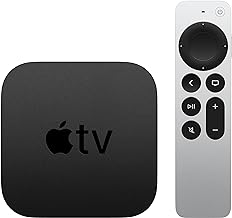


tvOS 27 Compatible Apple TV Models: Should You Upgrade?
Apple is drawing a hardware line in tvOS 27 for the first time in four years, cutting two older Apple TV models out of the update entirely (TechRadar, 2 months ago). But knowing whether your box makes the cut is only half the story. The more useful question, especially if you own one of the tvOS 27 compatible Apple TV models, is whether upgrading right now would actually get you anything.
Reporting drawn from developer sources and a WWDC preview session indicates that tvOS 27 drops the 2015 Apple TV HD and the 2017 first-generation Apple TV 4K, while the 2021 second-generation and 2022 third-generation models stay supported (TidBITS, last month; TechRadar, 2 months ago).
Worth noting up front: Apple hasn't published an official tvOS 27 compatibility page. This information traces back to a developer quoted by 9to5Mac and a slide shown during WWDC, not an Apple support document, so the specifics below should be read as well-corroborated reporting rather than confirmed fact (TidBITS, last month).
That distinction matters because the answer to "should I upgrade" looks different depending on which side of the cutoff you're on. This piece walks through three groups: owners whose Apple TV just got dropped, owners of the currently supported hardware, and anyone shopping for a new box. Each gets a straight answer, and each answer rests on slightly different evidence.
tvOS 27 Apple TV compatibility by model
The supported lineup is short: the second-generation Apple TV 4K from 2021, and both hardware revisions of the third-generation Apple TV 4K from 2022 (TechRadar, 2 months ago). If your Apple TV was purchased in the last four or five years, it's almost certainly one of these.
Everything older gets left behind. The 2015 Apple TV HD, originally called the fourth-generation Apple TV, and the 2017 first-generation Apple TV 4K both lose tvOS 27. This is the single most corroborated finding across the coverage: TidBITS, TechRadar, and The MacRumors Show independently arrived at the same list (TidBITS, last month; TechRadar, 2 months ago; The MacRumors Show, 2 months ago).
That level of agreement across three separate outlets is unusual for a pre-release detail Apple hasn't officially confirmed, and it's a big part of why this article treats the exclusion as close to settled even without an Apple document to point to.
What makes this notable is the pattern it breaks. TechRadar's reporting points out that Apple has generally kept its streaming devices current with each major software release, and this marks the first time in four years the company has cut Apple TV hardware from a major OS upgrade (TechRadar, 2 months ago). Apple TV owners have gotten used to their hardware aging gracefully. tvOS 27 is the exception, not the rule, at least so far.
Should you upgrade to a new Apple TV 4K for tvOS 27?
The answer splits cleanly along the line drawn above, but it's worth walking through each group rather than treating "upgrade" as a single yes-or-no question.
If you own a 2015 Apple TV HD or 2017 Apple TV 4K: your device isn't bricked. It's expected to keep running tvOS 26 (TechRadar, 2 months ago). What the reporting doesn't say is how long Apple will keep issuing security patches for that version, so there's a real but unquantified clock running here. The honest way to frame the decision is around specific features rather than a vague sense that newer is better. If the Podcasts redesign, Hi-Res Lossless Audio through a compatible speaker setup, or systemwide Dynamic Type for larger on-screen text would genuinely change how you use the device, a new Apple TV 4K buys you those things now. If your existing apps and shows work the way you expect, there's no technical failure waiting to happen the moment tvOS 27 ships. Staying put is a reasonable, low-risk choice, not a compromise.
If you own a 2021 or 2022 Apple TV 4K: tvOS 27 is coming to your device regardless of what you decide today, and it's coming free. The reports reviewed here don't identify a new hardware requirement tied to any of tvOS 27's confirmed features, with one narrow exception: Apple Music Sing has required a third-generation Apple TV 4K or later since tvOS 26, and TidBITS suspects, without confirming, that this restriction carries forward (TidBITS, last month). Outside of that one feature, there's no evidence the software update itself is pushing current owners toward a purchase. Update, yes. Buy something new, not on this basis.
If you're shopping for a new Apple TV: the case for waiting isn't about tvOS 27's system requirements. It's about timing. The features generating the most attention right now may be tied to hardware that doesn't exist yet in any confirmed form, and buying today means potentially missing that by a matter of months. More on that below.
What's actually new in tvOS 27
Setting the compatibility question aside, tvOS 27 does bring a handful of concrete improvements, and they're worth knowing regardless of which Apple TV sits under your television.
Apple Podcasts gets the most visible overhaul: a full redesign with video-podcast playback, a sidebar for browsing, and support for creator-supplied episode and show artwork (9to5Mac, last month). It follows similar video features Apple recently rolled out to Podcasts on iPhone and iPad, so tvOS is catching up to where the app already lives on other devices. Software updates also get easier to manage: the iPhone's Home app now lists Apple TV devices in its Software Update menu, and installs can happen while the Apple TV isn't in use, so you're less likely to get stuck waiting on an update right when you sit down to watch something (9to5Mac, last month). And systemwide Dynamic Type lets people scale text size across supported apps using a slider, a straightforward accessibility win that a lot of streaming interfaces have been slow to offer (9to5Mac, last month). None of the reporting on these three features ties them to a specific hardware tier, though the sourcing available doesn't cover every app's requirements in detail.
A couple of other additions come with strings attached. Apple Music finally gets AutoMix transitions on tvOS for the first time, alongside Hi-Res Lossless Audio (9to5Mac, last month). The lossless tier only works if you've got a compatible external speaker setup connected, so the Apple TV box is just one piece of that equation; the audio gear matters as much as the software.
Then there's the feature nobody can fully explain yet. A slide shown at WWDC referenced "Smart downloads on Apple TV," but the reports cited here don't explain how it works, which devices it applies to, or whether it ships with tvOS 27's initial release (9to5Mac, last month). It's the kind of detail worth watching for in a later beta or the eventual release notes, not something to factor into a purchase decision today.
Taken together, these are genuine, specific additions for specific people: Apple Music listeners with the right speakers, anyone who watches video podcasts, and anyone who benefits from bigger on-screen text. None of it reads like a case for buying new silicon, which is exactly why current 2021 and 2022 owners can treat the update as a free upgrade rather than a prelude to a purchase.
AI features and the unannounced Apple TV hardware question
Here's where the picture gets murkier, and where a lot of the "should I upgrade" anxiety around tvOS 27 actually originates.
tvOS 27 got almost no stage time when Apple unveiled iOS 27. 9to5Mac's take is that the platform's more significant capabilities are waiting on new Apple TV 4K hardware that hasn't shipped yet (9to5Mac, last month). That's a plausible read of a quiet keynote segment, but it's an inference from what wasn't said, not a confirmed roadmap.
TechRadar's reporting goes a step further, stating that the second- and third-generation Apple TV 4K will support tvOS 27 generally but are unlikely to get AI features, attributing that limitation to the hardware inside the current model (TechRadar, 2 months ago). That's a specific technical claim, and without a first-party Apple chip specification to check it against, it's worth treating as an expectation rather than an established requirement.
The same reporting speculates, explicitly framed as speculation, that a fourth-generation Apple TV 4K expected later in 2026 could become Apple's first streaming device built around native AI integration (TechRadar, 2 months ago). No launch date, price, or feature list appears anywhere in the articles cited here. Nobody has even defined what "AI integrations" would mean on an Apple TV: better Siri, on-device processing, smarter search, or something not yet described at all. That gap should temper how much weight this gets in a buying decision.
What this uncertainty actually argues for is patience, not urgency. It's a reason not to buy a current Apple TV 4K purely in hopes that AI features arrive on it later, since the reporting suggests they might not. It is not evidence that tvOS 27 itself is pressuring 2021 or 2022 owners to replace their hardware. That pressure, if it turns out to be real, comes from a product Apple hasn't announced, not from the software update covered in this article. That makes the rumored hardware more relevant to prospective buyers than to people who already own a supported Apple TV.
Where this leaves each type of owner
Owners of the 2015 Apple TV HD or 2017 Apple TV 4K face the clearest fact in all of this reporting: those devices lose tvOS 27 but keep running tvOS 26, with no confirmed timeline for how long security support continues after that (TechRadar, 2 months ago; TidBITS, last month). Wait, unless one of tvOS 27's specific new features is something you'd actually use.
Owners of the 2021 or 2022 Apple TV 4K get to have it both ways: update to tvOS 27 for free when it arrives, and skip any purchase, since nothing in the confirmed feature set forces new hardware. The distinction worth holding onto is that updating and buying are two different decisions, and only the first one has solid footing right now.
Prospective buyers are the group with the least certainty and the most reason to sit tight. Whether a fourth-generation Apple TV 4K actually arrives in 2026, what AI features it might carry, and whether those features would justify the price are all open questions that the current reporting doesn't answer. Rather than guess, the more sensible move is to wait for Apple's own documentation or a formal announcement before spending money on a box that might be a generation behind within months.
For everyone else, the smartest move this week is also the simplest one: do nothing, and wait for Apple to say something official.

















Comments
Be the first, drop a comment!