





Reviewed by: Y. Garcia
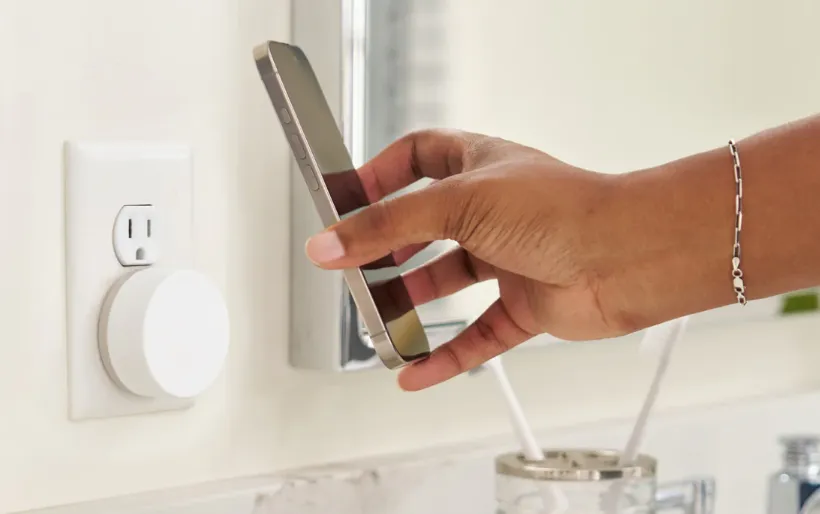
Twelve South's PowerBug, a Qi2 wall charger that snaps an iPhone directly to its face with no cable between outlet and phone, is drawing renewed attention this week after 9to5Mac published a full review of the $49.99 cordless iPhone wall charger.
The concept is straightforward: plug it into the wall, attach the phone magnetically, and the counter stays clear. For anyone already using iOS StandBy mode, that's a meaningful change to a setup most people have quietly tolerated rather than solved.
The Twelve South PowerBug eliminates the adapter-cable-puck chain by integrating plug prongs directly into the back of the unit. The charging surface is the wall adapter itself. With the iPhone docked sideways, iOS 17 or later automatically activates StandBy, turning the phone into a persistent ambient display. No stand on the counter, no cord running to it.
It delivers full Qi2-certified 15W wireless charging, and a USB-C port on the underside supplies up to 35W to a second device simultaneously, per 9to5Mac and Serious Insights. The current Twelve South product page lists a two-year manufacturer's warranty, though Serious Insights earlier cited a one-year limited warranty against defects in workmanship and materials. Buyers should verify current warranty terms directly with Twelve South before purchasing.
What PowerBug replaces and why that's the only comparison that matters
Reviewers frame this product less as a faster charger than as a cable-reduction option for specific rooms. The question isn't whether it beats a standalone MagSafe puck on speed or price. It's whether it does a better job than whatever is already occupying the outlet.
Most MagSafe-compatible stands are passive accessories that require a separate wall adapter and a cable to function. Serious Insights noted that the PowerBug consolidates all three components into a single 95-gram unit, removing that redundancy. Even tidy MagSafe setups leave a cord running from outlet to stand. 9to5Mac observed this week that by turning the wall adapter itself into the charging surface, the PowerBug eliminates cable clutter rather than relocating it.
The USB-C port changes the calculus further. Used on its own, it delivers 35W via PD 3.0 and PPS, enough to charge an iPad or MacBook Air without a phone docked at all, per 9to5Mac. That means it can replace whatever brick is currently in the outlet rather than competing for a second one.
The use-case comparison is straightforward: an outlet currently holding a 35W USB-C adapter, with a Qi2 stand sitting on the counter beside it, becomes a single wall unit with a cleared surface. If the outlet is doing nothing and the counter is already clear, the case is weaker.
Twelve South PowerBug review: where it works best
PowerBug's usefulness scales directly with outlet placement. Put it in the right spot, and it's a clean, permanent solution. Put it behind furniture or near the floor, and it becomes an expensive plug with no practical dock function.
Gadget Geek Boy specifically identifies kitchens, hallways, and bedside nooks as the product's home territory. Surface space is limited in those rooms, and a counter-based stand consumes valuable space. Twelve South's own marketing leans into kitchen use: setting timers, checking the weather, and managing smart home devices from across the room, according to the product page.
In its own usage example, Gadget Geek Boy describes keeping one in the kitchen, dropping the iPhone sideways so it switches into StandBy as a glanceable clock, calendar, and photo display while cooking.
StandBy behavior is worth understanding before buying. On iPhone Pro models with Always-On Display, the screen stays lit continuously. On other models, it wakes on tap or notification, as Gadget Geek Boy noted earlier this year. If glanceable-from-across-the-room is the goal, a Pro model delivers it without having to walk over.
Available reviews don't address how the PowerBug handles horizontal duplex outlets where an adjacent plug eats the clearance, or lower outlets positioned behind appliances where the phone would hang at shin height. These aren't edge cases. They're common configurations in older homes and apartment kitchens. Whether your outlet qualifies is worth checking before committing to $49.99.
Compatibility is equally non-negotiable. The magnetic hold requires Qi2 or MagSafe alignment, meaning iPhone 12 or later, or other Qi2-certified devices with the correct magnets. Older Qi-only phones will charge wirelessly at reduced speed but won't lock to the pad, per Gadget Geek Boy. Without that magnetic lock, the floating dock function is effectively unusable. This isn't a footnote. It defines the product's actual audience.
Twelve South PowerBug Qi2 charger: charging specs and trade-offs
The specs don't need to impress. They need to not be a reason to say no. At $49.99, the PowerBug would be a hard sell if the wall-mount form factor came at the cost of charging speed.
On paper, there's no wattage penalty. The Qi2 pad delivers up to 15W wirelessly, the ceiling for first-generation Qi2 but below the 25W supported by Qi2.2 and newer MagSafe iPhones, per 9to5Mac and Serious Insights. With both channels running simultaneously, the unit delivers 15W wireless while the USB-C port steps up to 20W, keeping the combined output at 35W. PD 3.0 and PPS support ensures the wired side works with a wide range of devices, per Serious Insights.
A few things it doesn't do:
No Apple Watch charging
No USB-C cable in the box
No Qi2.2 support, which 9to5Mac flagged as the one notable gap, though Qi2.2 hardware remains scarce as of mid-2026
Anyone needing a single charger for an iPhone and a Watch should look elsewhere. Twelve South's own ButterFly SE handles both, though it requires a separate wall adapter, per the ButterFly SE product page. The PowerBug is an iPhone-first device and makes no pretense otherwise.
Who it's for and who should skip it
The fit is clearest for someone with a visible, conveniently placed outlet in a tight-space room, such as a kitchen, bedside wall, or hallway, who already uses StandBy or wants to. It's less suitable if the nearest outlet is low, blocked, or in a location where a floating iPhone at wall height serves no purpose. Same goes for anyone on an older Qi-only phone or needing Apple Watch charging in the same footprint.
At $49.99, the PowerBug replaces a wall adapter, a Qi2 stand, and the cable connecting them. Its 35W USB-C port means it earns the outlet slot even when no phone is docked, per the Twelve South product page and 9to5Mac's review this week.
The broader signal here is worth noting as an observation rather than a trend: Qi2 accessories are starting to move off surfaces and into the wall itself. Whether that's useful depends entirely on which outlet is in front of you. For the right one, this is a tidy solution to a problem most people assumed required a cable.















Comments
Be the first, drop a comment!