





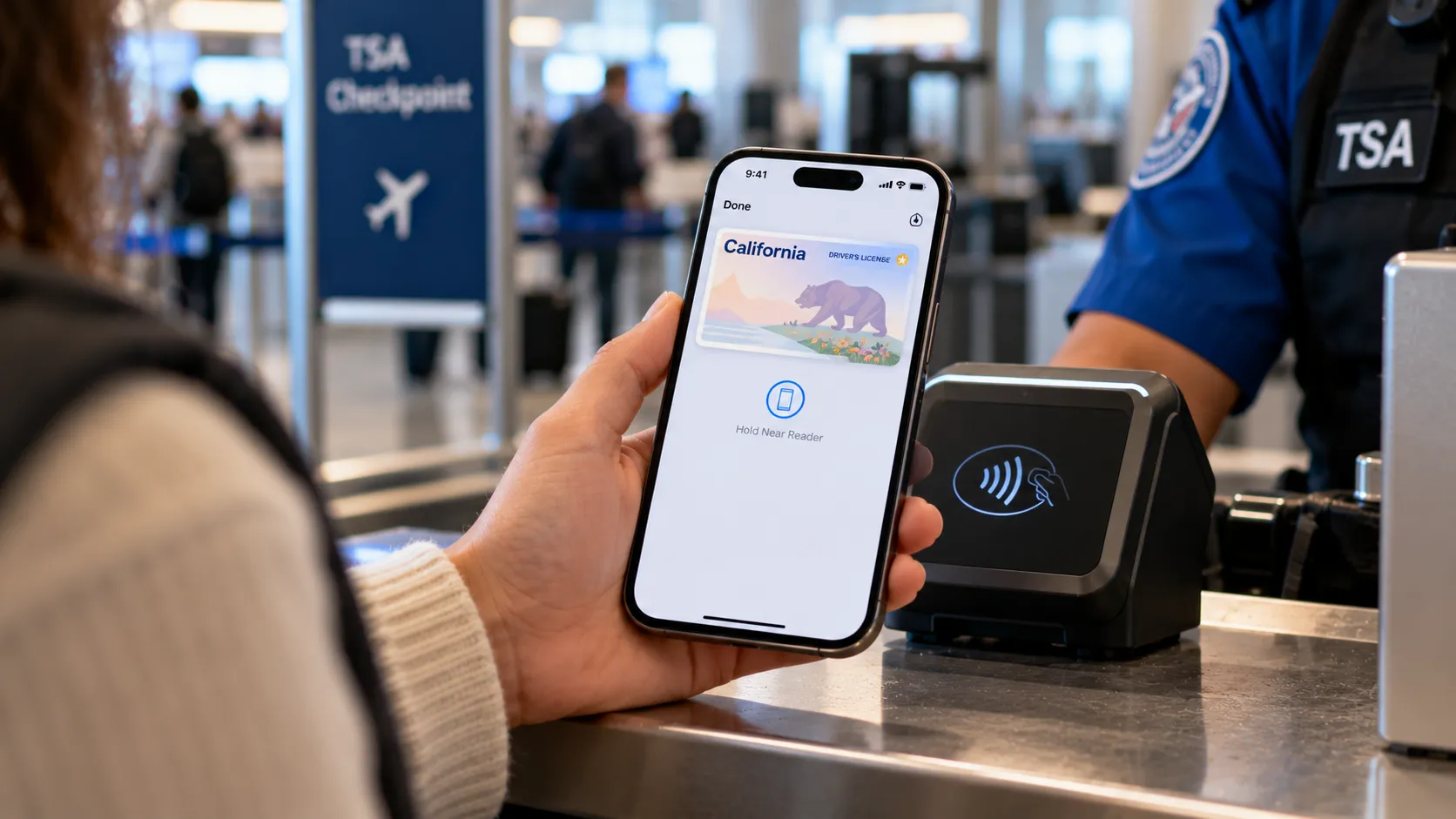
Apple Wallet can store a state-issued driver's license or ID, but that doesn't mean every state qualifies as one of the states that accept a driver's license in Apple Wallet at TSA checkpoints.
According to TSA's participating states and eligible digital IDs list cited in this guide, 16 states plus Puerto Rico support Apple Wallet specifically for checkpoint use. Other states may use a state-built app instead, or may not appear on TSA's eligible-ID list at all.
That distinction matters because having a digital ID somewhere doesn't mean a TSA officer, a police officer, or a business will accept it. California's DMV, which has one of the more developed Apple Wallet rollouts in the country, states that law enforcement, state agencies, and most businesses aren't yet accepting its mobile driver's license.
Participating TSA checkpoints are among the clearest places this feature works, though availability still varies by location.
This guide breaks down which states are listed as eligible, what to check with your own DMV before setting one up, how the checkpoint process works, and what to do before you rely on it for a flight.
The 16 states (and Puerto Rico) on TSA's Apple Wallet list
Three states are listed with Apple Wallet as their only eligible digital-ID option for TSA checkpoint use:
Hawaii
Illinois
Oklahoma
The remaining 13 states are listed with Apple Wallet alongside other wallets or a state-built app:
Arkansas: Arkansas Mobile ID, Apple Wallet, Google Wallet, Samsung Wallet
Arizona: Apple Wallet, Google Wallet, Samsung Wallet
California: California DMV Wallet App, Apple Wallet, Google Wallet
Colorado: CO Mobile ID, Apple Wallet, Google Wallet, Samsung Wallet
Georgia: Apple Wallet, Google Wallet, Samsung Wallet
Iowa: Iowa Mobile ID app, Apple Wallet, Google Wallet, Samsung Wallet
Maryland: Apple Wallet, Google Wallet, Samsung Wallet
Montana: Apple Wallet, Google Wallet
New Mexico: Apple Wallet, Google Wallet
North Dakota: Apple Wallet, Google Wallet, Samsung Wallet
Ohio: Apple Wallet, Google Wallet
Virginia: VA MiD app, Apple Wallet
West Virginia: WV MiD app, Apple Wallet, Samsung Wallet
Puerto Rico also appears on the list with Apple Wallet and Google Wallet support, though it's worth remembering Puerto Rico is a US territory, not a state.
These entries reflect the TSA list cited for this guide. Because participating states and supported wallets can change, check the live TSA list before traveling.
Not every digital ID qualifies even inside a supported state. TSA generally requires an eligible mobile driver's license to be based on a REAL ID-compliant license, an Enhanced Driver's License, or an Enhanced Identification Card. A standard, non-REAL-ID credential isn't automatically eligible simply because its issuing state supports digital IDs.
If your state isn't on this list, check TSA's current page and your issuing state's DMV before assuming your phone can stand in for your physical card at security.
Why some digital-ID states skip Apple Wallet entirely
This is where the lists get easy to conflate. TSA separately maintains a table of states that have received a federal waiver allowing residents to use approved mobile driver's licenses for federal purposes, and the REAL ID Mobile Driver's Licenses page cited in this guide lists 22 states plus Puerto Rico. Holding a waiver is not the same as appearing on the Apple Wallet checkpoint list.
Alaska, Kentucky, Louisiana, New York, and Utah appear on that federal waiver list. But the participating-states table cited here doesn't list Apple Wallet support for any of them; their listed digital-ID options are state-built apps, specifically Alaska Mobile ID, KY Mobile ID, LA Wallet, NY MiD, and the GET Mobile App.
Connecticut sits in its own category. It appears on the cited waiver list but not on the participating-states table used for this guide, whether for Apple Wallet, Google Wallet, or a state app. Those listings don't establish a currently available checkpoint workflow for Connecticut residents; a waiver alone doesn't tell readers which app or checkpoint process is live.
Federal enforcement of the REAL ID standard took effect on May 7, 2025. Federal acceptance of mobile driver's licenses depends on applicable waivers, agency policies, and technical requirements. Acceptance policies vary by agency rather than following one uniform national rule.
How to add a driver's license to Apple Wallet (and what to check first)
Setup is simple once your state qualifies. Open Apple Wallet, tap the plus sign, select Driver's License or ID Cards, choose your state, and follow the on-screen instructions to begin enrollment. Apple says users may need to scan the front and back of their physical ID and complete identity verification before the issuing authority approves it.
Device requirements are where it pays to check before you start. Apple's developer documentation identifies several different minimums:
Most participating states: iPhone 8 or later with iOS 16.5 or later, or Apple Watch Series 4 or later with watchOS 9.5 or later.
Arkansas and Oklahoma: iPhone 8 or later with iOS 16.5 or later, or Apple Watch Series 6 or later with watchOS 11 or later.
Virginia: iPhone 8 or later with iOS 16.5 or later, or Apple Watch Series 6 or later with watchOS 10 or later.
California: iPhone XS or later with iOS 17.5 or later, or Apple Watch Series 4 or later with watchOS 10 or later.
Puerto Rico: iPhone XS or later with iOS 18.1 or later, or Apple Watch Series 6 or later with watchOS 11 or later.
These are published minimums, not a reason to avoid installing newer compatible software.
Enrollment steps and eligible license types are also controlled by the issuing authority. A state appearing on TSA's list doesn't guarantee your specific iPhone, Apple Watch, or license type will clear setup today. Your own DMV's instructions are the source to check before enrolling.
How the TSA checkpoint process actually works
At a participating checkpoint, double-click the side button on an iPhone with Face ID, or use the appropriate Wallet shortcut on another supported device. Select the driver's license or ID, then hold the device near the identity reader.
Review the information being requested and authorize sharing using the authentication method prompted on the device. Depending on the iPhone model and settings, this may involve Face ID, Touch ID, or an accessibility-supported alternative. On Apple Watch, confirmation generally uses a double-click of the side button.
Apple explains the process in its official presentation guide.
TSA's broader digital-ID rollout covers mobile driver's licenses and other supported digital credentials, not Apple Wallet specifically. A checkpoint's general digital-ID capability doesn't guarantee that every airport lane accepts every supported wallet.
Check TSA's guidance and airport checkpoint signage before relying on the feature. An airline may also have its own identification requirements, separate from TSA screening.
TSA advises travelers to carry a physical, acceptable form of ID even when using a digital ID. Its FAQ reinforces that travelers should bring physical identification regardless of the digital option they use.
Apple also supports a separate Digital ID created from an eligible US passport. That is different from adding a state-issued driver's license, and it doesn't replace a physical passport for international travel.
Where else your Apple Wallet ID works, and where it doesn't
Airports aren't the only places California has built acceptance. California DMV describes select merchants accepting the ID in person through compatible identity readers, while participating apps can request identity information through a Verify with Apple Wallet button.
California DMV has also published a program letting businesses adopt mobile driver's license readers and use them for age and identity verification at point-of-sale terminals (California DMV). It's a sign of active investment in broader acceptance, but it's California-specific infrastructure.
The more important caveat is the one California's DMV states directly: the mobile driver's license is authorized for limited uses, and law enforcement, state government agencies, and most businesses aren't yet accepting it.
In practice, a digital driver's license isn't a dependable substitute for your physical card at a traffic stop, an unfamiliar business, or a government office, even in a state with an established Apple Wallet rollout.
TSA checkpoints are among the better-documented use cases. Everything else remains dependent on the location and the organization requesting identification.
What happens to your ID if your iPhone is lost
The verification exchange is designed to avoid handing over the device. Apple says users can present an ID digitally to a compatible reader without giving another person their iPhone or Apple Watch.
Sharing requires user authorization, and Apple's privacy documentation states that ID information is encrypted and that neither Apple nor the issuing authority can see when and where the ID is presented.
TSA separately describes consent-based sharing at checkpoints, with additional identity verification procedures that may include facial comparison.
If a phone goes missing, Apple's Find My service can help protect the device. Users can place a missing iPhone in Lost Mode or remotely erase it when appropriate. Apple's ID-in-Wallet guidance also provides procedures for removing an ID from a lost or unavailable device.
California DMV documents remote management through Find My and iCloud as part of its mobile-ID guidance. If you're enrolling through a different state's DMV, check its instructions for lost-device recovery and re-enrollment.
What to do before your next flight
Three things to confirm before you lean on this feature at the airport:
Check that your issuing state, or Puerto Rico, appears on TSA's current participating-states page with Apple Wallet support.
Confirm with your own DMV that your specific license type and iPhone or Apple Watch meet its setup requirements.
Pack your physical license or another acceptable physical ID anyway. TSA advises travelers to carry physical identification even where mobile IDs are accepted.
A digital ID in Apple Wallet may simplify the identity check at a participating checkpoint, but it isn't a universal replacement for a physical card. Confirming eligibility, device compatibility, and checkpoint availability before leaving home is the safest way to avoid a surprise at security.
















Comments
Be the first, drop a comment!