



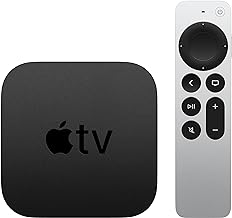


How to Install tvOS 27 RC on Apple TV (Or Why to Wait)
Apple seeded tvOS 27 RC, build 24J360, to developers and public beta testers yesterday, and the update is now available through Software Update on enrolled compatible Apple TVs (MacRumors, yesterday; iClarified, yesterday). If you're trying to figure out how to install tvOS 27 RC, the requirement comes first: it runs on Apple TV 4K (2nd generation, 2021) or newer, and it does not run on the Apple TV HD (2015) or the original Apple TV 4K (2017) (iThinkDiff, 2 weeks ago; iClarified, yesterday).
Two paths exist right now. Anyone enrolled in Apple's public beta program can download tvOS 27 RC today through the standard Software Update menu. Anyone who doesn't need it immediately can just wait, since AnotherApple reports that the same build is expected to reach everyone the following week (AnotherApple, yesterday).
Given how close that public release is, the real question isn't whether you can install the RC. It's whether you should. tvOS 27 is a modest update this cycle, and grabbing it a few days early doesn't add up to much if the Apple TV in question is one the whole house uses daily. This guide covers what's actually changing, why waiting might be the smarter call for a primary device, and the exact steps to install tvOS 27 RC if you decide the small head start is worth the beta risk.
What's new in this tvOS 27 release candidate update
The headline change is a redesigned Podcasts app, alongside larger text options and a more responsive Control Center, all confirmed in the RC by both MacRumors and iClarified (MacRumors, yesterday; iClarified, yesterday). An earlier public beta report added more detail: the Podcasts redesign includes sidebar navigation and Smart Downloads, and the larger-text option runs through Dynamic Type support. That reporting predates this RC, so treat those specifics as expected carryovers rather than newly confirmed RC features (iThinkDiff, 2 weeks ago).
Performance gets a real bump too. MacRumors and iClarified both describe faster AirPlay connections and smoother app launches and animations, which mostly shows up as less lag between tapping AirPlay on an iPhone and seeing video appear on the TV (MacRumors, yesterday; iClarified, yesterday). Settings can now show AppleCare coverage details directly, useful for checking coverage without leaving the Apple TV (MacRumors, yesterday).
Two things are worth flagging before assuming this build has everything. That same earlier public beta report listed Hi-Res Lossless Audio in Apple Music as a tvOS 27 feature, but nothing in current RC coverage confirms it's actually present in build 24J360 (iThinkDiff, 2 weeks ago). That report also said Siri AI wasn't part of the public beta and was expected to arrive before the final release ships this month. Current RC reporting doesn't say either way, so don't install expecting it (iThinkDiff, 2 weeks ago).
Why waiting may be smarter
Apple only turns a release candidate into the public release if no new bugs surface during this final testing pass, according to MacRumors, which makes tvOS 27 RC not technically final even though it's the version Apple expects to ship (MacRumors, yesterday). It's still beta software, and prior public beta testing on this same release confirmed it can misbehave (iThinkDiff, 2 weeks ago).
The bigger risk is what happens if something breaks. One beta-testing guide states there's no over-the-air path back to tvOS 26, and reverting would require a full restore through Apple Configurator 2 on a Mac (iThinkDiff, 2 weeks ago). Apple's own support documentation on updating Apple TV doesn't address downgrading at all, so that claim can't be verified against an official source here. Treat it as an unverified claim from a third-party guide, not a settled fact.
If that rollback limitation holds, it matters most on a shared household Apple TV. A spare or test unit can absorb a bad update without much cost. The only Apple TV in the house cannot.
Install tvOS 27 RC now if you have a secondary or test device, don't mind troubleshooting the occasional beta bug, and specifically want early access to the redesigned Podcasts app or the AirPlay speed improvements. Wait if this is your household's primary streaming device, you use it daily without interruption, or the rollback situation above makes you uneasy.
Timing supports waiting for most people. iClarified reports Apple's OS 27 updates, tvOS included, are expected around September 14, and AnotherApple separately reports the same RC build reaching everyone the following week, so the practical upside of installing today is a short head start, not access to something otherwise locked away (iClarified, yesterday; AnotherApple, yesterday).
If you'd rather wait, set your Apple TV to install the public release on its own: go to Settings, then System, then Software Updates, and turn on Automatically Update. That way there's nothing to remember when Apple makes the update available (Apple Support, 5 months ago).
How to install tvOS 27 RC on Apple TV
Prerequisites: a compatible Apple TV 4K (2nd generation, 2021) or newer, an Apple Account, and free enrollment in Apple's public beta program if you're not already a registered developer (iThinkDiff, 2 weeks ago; AnotherApple, yesterday). If you're unsure which Apple TV you own, the model year is the simplest indicator: 2021 or later qualifies, 2017 or earlier does not.
- Enroll in the beta program. Skip this if you already have a registered developer account. Otherwise, to install tvOS 27 public beta updates, go to beta.apple.com in any browser and sign in with your Apple Account. First-timers click Sign Up and accept the program terms; enrollment is free (iThinkDiff, 2 weeks ago).
- Enroll your Apple TV. From the beta site, find the tvOS section and select Enroll Your Apple TV. Enrollment ties to your Apple Account, so there's nothing to download or sideload manually (iThinkDiff, 2 weeks ago; AnotherApple, yesterday).
- Turn on beta updates on the device. On the Apple TV, open Settings, then System, then Software Updates, and toggle on Get Beta Updates. The update may not appear unless the Apple TV is signed in with the same Apple Account used for enrollment (iThinkDiff, 2 weeks ago).
- Check for the update. Still inside Software Updates, select Update Software to download tvOS 27 RC (AnotherApple, yesterday). If it doesn't appear right away, wait a few minutes and check again, since propagation to Apple's servers isn't instant (iThinkDiff, 2 weeks ago).
- Download and install. Select Download and Install, then keep the Apple TV connected to power and to Wi-Fi or Ethernet the whole time. It restarts automatically once installation finishes; once the update appears, installation typically takes 10 to 20 minutes (iThinkDiff, 2 weeks ago; Apple Support, 5 months ago).
- Or trigger it from an iPhone. iPhone owners running iOS 27 can open the Home app, find the Apple TV, and start the download from its Software Update section without touching the Apple TV directly (iThinkDiff, 2 weeks ago).
- Confirm it worked. After the restart, go to Settings, then System, then About, and check that the version reads tvOS 27 (iThinkDiff, 2 weeks ago).
- Turn beta updates back off once you're satisfied. Doing this doesn't remove tvOS 27 RC or roll the Apple TV back; it only stops future beta builds from downloading after this one. If you only wanted this RC, return to Settings, System, Software Updates, and switch Get Beta Updates off again.
How to update Apple TV to tvOS 27 RC if it doesn't appear
If Update Software still doesn't show tvOS 27 RC after a few minutes, confirm the Apple TV is connected to Wi-Fi or Ethernet, since Apple lists a missing network connection as one common reason an update won't show up (Apple Support, 5 months ago). If it still doesn't appear after that, double-check the Apple Account signed in on the Apple TV matches the one enrolled at beta.apple.com. A mismatch there is the most common reason the RC stays hidden.
If the progress bar looks stuck partway through, check what's actually on screen before touching the power cable. Apple's support documentation draws a clear line here: if "Preparing Update" or "Applying Update" is showing and it's been stalled for more than an hour, contact Apple Support before restarting or unplugging anything. Unplugging is only the recommended fix when the screen shows a bare Apple logo with no text and it's been stuck that same hour (Apple Support, 5 months ago). Pulling the plug during a text-labeled stall risks interrupting an install that's still progressing normally.
Decide before you update
Check your Apple TV model first. A 2nd-generation 4K model from 2021 or later can run tvOS 27 RC; anything older can't (iThinkDiff, 2 weeks ago). From there, the choice is straightforward: enroll a spare or test unit if a short head start on the redesigned Podcasts app and faster AirPlay is worth some beta risk. Leave Get Beta Updates off on the Apple TV your household uses every day, turn on Automatically Update instead, and let the public release arrive on its own once Apple ships it.





Comments
Be the first, drop a comment!