





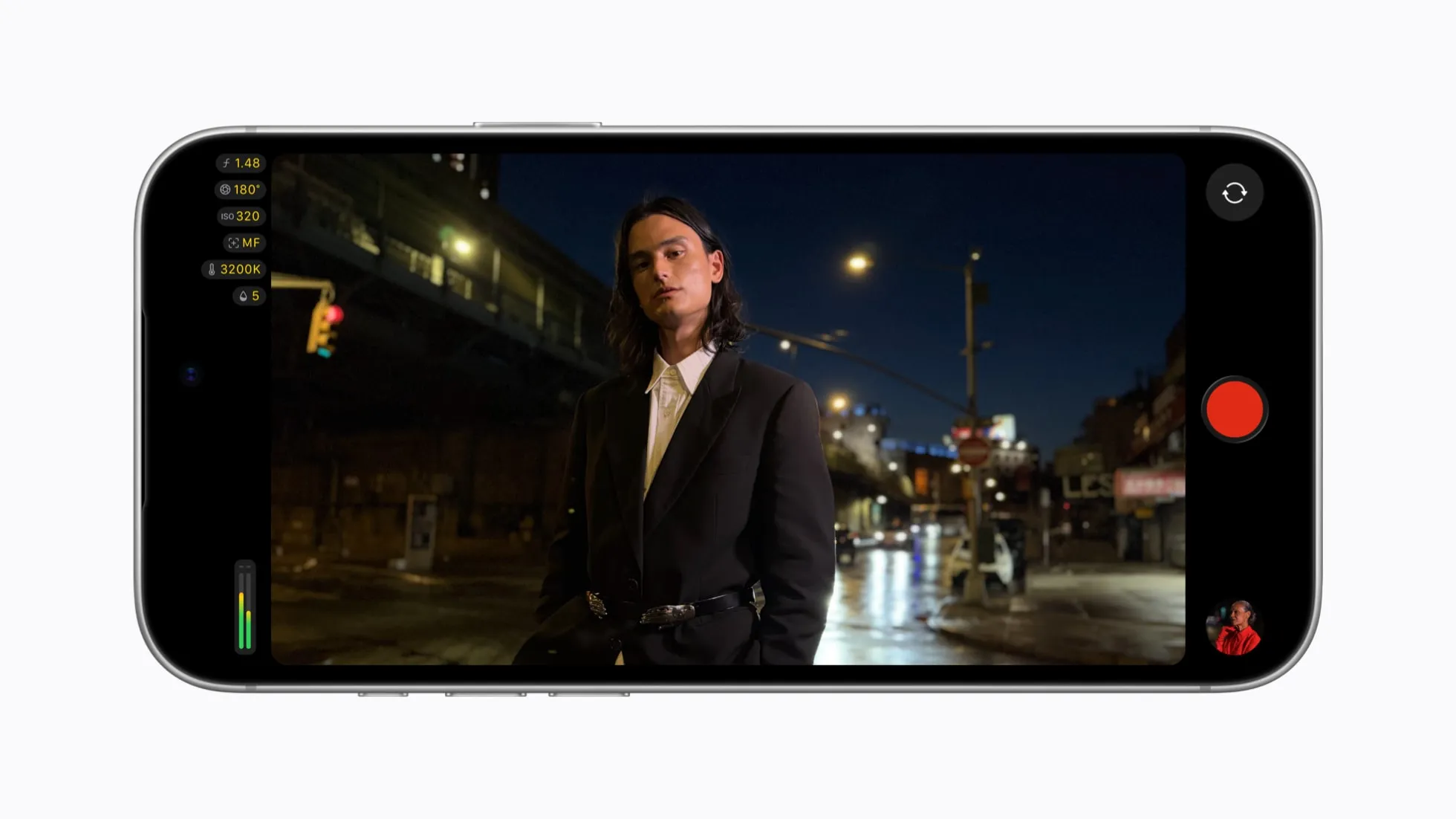
Apple released Final Cut Camera 2.4 recently, giving the app direct control over the iPhone 18 Pro's variable-aperture lens for the first time. This Final Cut Camera iPhone 18 Pro variable aperture support lets users dial in specific aperture settings or switch to shutter-priority and aperture-priority modes while recording video, instead of leaving exposure to the camera's automatic choice.
The free update also adds a redesigned interface for overlays like shutter angle, ISO, and white balance, plus quick access to frame rate, color modes, and encoding formats. Reporting splits on which tools need which iOS version.
The variable-aperture controls are limited to the iPhone 18 Pro and Pro Max, although the Final Cut Camera app itself is not limited to those models. Apple's announcement describes the 48MP Fusion Main camera as the company's first iPhone camera with a variable aperture, capable of widening to ƒ/1.48 for low light or narrowing to ƒ/4 for more depth of field, tied to the iPhone 18 Pro launch.
Who can update Final Cut Camera right now
Final Cut Camera 2.4's new camera settings require an iPhone 18 Pro or Pro Max, according to reports. The app itself runs on other iPhones, but variable aperture control does not extend to them. Unlike some other Creator Studio features shipping this week that need a $13-per-month subscription, the aperture tools require an iPhone 18 Pro or later running iOS 27 or later, but not a paid plan.
That's good news on cost, less so on clarity around software. Final Cut Camera itself requires iOS 26.6 or later, while Apple's support documentation says the new aperture controls require iOS 27 or later.
Which Final Cut Camera iOS 27 features need the newer OS?
Tom's Guide attributes a specific set of tools — professional video scopes, clean SDI output, and a genlock offset setting — directly to iOS 27. Apple's support documentation says the core aperture controls also require iOS 27 or later, so users need both compatible iPhone hardware and the newer OS.
Treat iOS 27 as the requirement for the broadcast-monitoring extras specifically, and check the app's release notes before counting on scopes, SDI output, or genlock for a paying job. Treat iOS 27 as the requirement for both the new aperture controls and the broadcast-focused additions such as video scopes and clean SDI output.
Capture controls now, editing controls later
The headline addition is aperture selection across the lens's full range during recording, plus aperture-priority and shutter-priority modes for exposure control mid-shoot. Apple's native Camera app, by contrast, only offers four fixed aperture stops, namely ƒ/1.4, ƒ/1.8, ƒ/2.8, and ƒ/4, with third-party apps expected to move smoothly between those points instead of jumping between hard stops.
Apple's announcement confirms the native app exposes four adjustable settings and that a developer API exists for finer control across the aperture range, which is presumably how Final Cut Camera gets its extra precision. Whether Final Cut Camera's selection is truly continuous or just offers more discrete steps than the native app hasn't been independently confirmed.
Editing sits on a separate track. Final Cut Pro and Motion now support adjusting focus points and depth of field on footage shot with the iPhone 18 Pro's variable aperture, but that capability lives in those two apps, not inside Final Cut Camera itself. Version 2.4 also adds Cinematic mode effects to other recordings, including footage captured in ProRes and Apple Log. Anyone wanting to adjust focus after the fact needs Final Cut Pro or Motion in the workflow, on a Mac or iPad, not just the phone.
The niche stuff: scopes, SDI output, and remote control
Version 2.4 also adds professional video scopes, clean SDI output, and a genlock offset setting, tools tied to iOS 27 specifically. These are built for multicamera and broadcast workflows, not solo shooters, and most casual users will never open that menu.
Final Cut Camera can also be controlled remotely from Final Cut Pro for iPad during a Live Multicam session, allowing the user to adjust pro controls on the phone while recording. That could help a solo operator monitor or adjust the phone from a separate position, though it still assumes access to a second Apple device and the Final Cut Pro app.
What variable aperture still can't do
Stopping the lens down to ƒ/4 cuts roughly three stops of light, comparable to an ND8 filter, which covers overcast days and indoor shooting but won't replace an ND filter in direct sun, according to filmmaker Who Is Matt?'s testing. Narrowing the aperture to ƒ/2.8 or ƒ/4 also produced visible sun-star artifacts on point light sources in his tests, baked directly into the clip with no way to remove them afterward, worth a test shot before relying on a narrow aperture around streetlights or sun glare.
The maximum aperture of ƒ/1.48 is roughly half a stop brighter than the iPhone 17 Pro's ƒ/1.78 lens, per the same review, a real but modest low-light gain rather than a jump to dedicated-camera performance.
Owners of an iPhone 18 Pro or Pro Max can update Final Cut Camera today at no cost and get manual aperture control, priority exposure modes, and the redesigned overlay interface immediately. Before anything important, check the installed iOS version and confirm which tools actually load, since the professional scopes, SDI output, and genlock offset reportedly sit behind iOS 27 specifically. Test aperture changes in the exact recording mode planned for the shoot, and keep an ND filter in the bag regardless. The new lens narrows exposure well, but testing found it still produces sun stars in bright, direct light.






Comments
Be the first, drop a comment!