





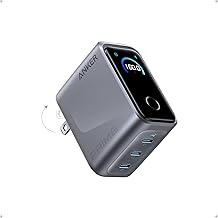
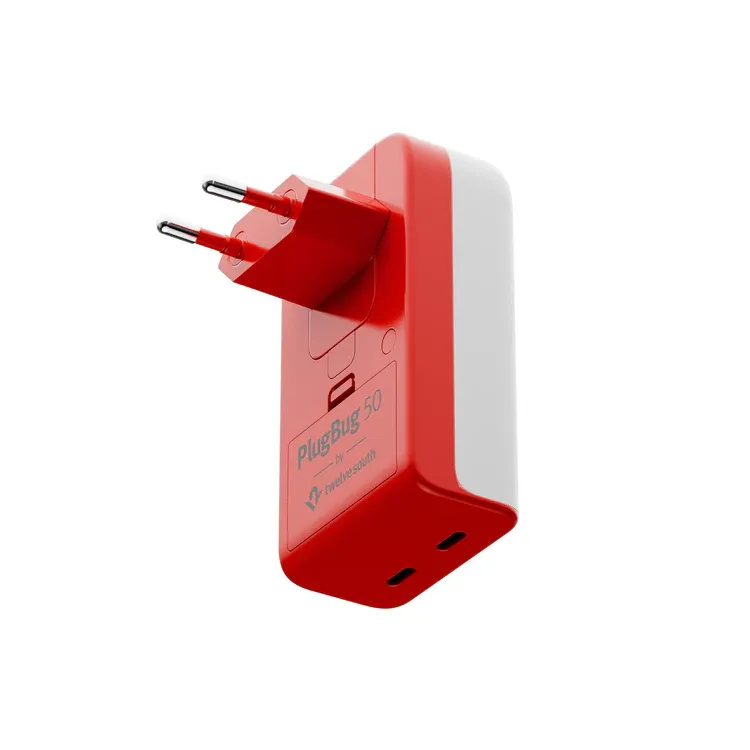
Travel anxiety often peaks the moment you realize your charger isn't in your bag. You know the feeling—frantically digging through luggage, checking hotel nightstands, and replaying where you last plugged in your devices. Twelve South's PlugBug with Find My tackles this universal frustration head-on by becoming the world's first power supply with Find My integration. This isn't just marketing speak—it essentially gives your charger built-in AirTag functionality, combining Apple's location tracking network with legitimate high-powered charging capabilities.
For Apple ecosystem users juggling multiple devices and constantly on the move, the PlugBug is something we've needed for years: a charger you can actually find when you need it most. Let's break down whether this premium accessory lives up to its ambitious promises.
What makes the PlugBug different from other travel chargers?
Here's the thing about travel chargers—most of them focus purely on power delivery and call it a day. The PlugBug takes a different approach entirely. Available in two configurations—50W with two ports and 120W with four ports—both models pack serious charging capability into surprisingly compact packages thanks to advanced GaN (Gallium Nitride) technology.
The power specs alone are impressive. The 120W version can deliver its full power to a single USB-C port, meaning it'll happily fast-charge everything from a MacBook Pro down to an iPhone without breaking a sweat. This efficiency comes from GaN technology's superior heat management—despite its power capacity, the charger remains relatively compact thanks to highly efficient GaN technology, which generates significantly less heat than traditional silicon-based chargers.
What really sets this apart is how seamlessly the tracking functionality integrates into the charging experience. The device works exactly like an AirTag and is set up the same way in the Find My app's Items section. No additional apps, no complicated pairing processes—if you've ever set up an AirTag, you already know the drill. The Find My functionality is powered by a replaceable coin cell battery that lasts about a year, so the location features work whether your charger is plugged into the wall or buried somewhere in your luggage.
The physical design clearly prioritizes travel convenience. The slim, vertical profile fits into tight spaces that would challenge bulkier chargers—those awkward hotel outlets behind nightstands finally meet their match. The US model features folding prongs for extra travel slimness, while international versions come with multiple plug adapters that snap in and out effortlessly.
How does the Find My integration actually work in practice?
You might be wondering how well Apple's Find My network actually performs when you're tracking a wall charger instead of your AirPods. The short answer is remarkably well, but let me walk you through the real-world experience.
Initial setup takes about thirty seconds. Users simply pull the tab from the battery compartment, press the connect button, and pair it through the Find My app. Once connected, the charger can be tracked almost anywhere via Apple's global network of devices. This isn't limited to major cities either—anywhere there's an iPhone, iPad, or Mac nearby, your charger can potentially ping its location.
The practical applications extend far beyond the obvious "where did I leave my charger" scenarios. Users can trigger an audible alert to help locate the charger when it's nearby, which proves surprisingly useful when it's hiding behind furniture or mixed in with other electronics. The Find My app also enables smart notifications—sending alerts like "notify me when left behind" at selected locations—essentially creating a safety net for forgetful travelers.
But here's where it gets clever: the PlugBug can double as a luggage tracker when packed in checked bags. Think about it—you're already packing a charger anyway, so why not let it pull double duty? This effectively replaces dedicated luggage trackers while ensuring your essential charging equipment remains findable throughout your journey.
The battery situation deserves mention here. Unlike rechargeable AirTags that don't exist, the battery lasts just over a year, and the PlugBug does not need to be plugged in for the tracking to work. When replacement time comes, it's a standard coin cell battery you can grab at any convenience store.
Power delivery performance: Does it live up to the specs?
Premium pricing demands premium performance, so let's talk about how well this thing actually charges your devices. The PlugBug's intelligent power management system eliminates the usual guesswork about which port to use for optimal charging speeds.
The charger detects which devices are connected and dynamically delivers the right amount of fast charging power, adjusting output based on what each device can actually handle. Real-world testing reveals impressive results that match the marketing claims. When charging an M4 iPad Pro alone, the device received a maximum of 36W, while an iPhone 15 Plus drew its maximum 25W—exactly what you'd want from each device's charging profile.
Multi-device scenarios showcase the smart power distribution really well. When charging both an iPad and an iPhone simultaneously, the iPad received 29W while the iPhone got 19W, demonstrating how the system intelligently prioritizes power delivery based on device requirements rather than just splitting wattage equally. For the 120W model with all four ports occupied, power typically splits as 50W for one device, with the remaining three ports sharing 25W each.
The efficiency advantage becomes apparent when you compare this to competing chargers. The PlugBug manages to deliver four times as many ports as Apple's larger MacBook charging brick while maintaining a similar size. This size efficiency translates into practical benefits for travelers who need maximum charging capability without sacrificing precious bag space.
One thing to note: the 50W and 120W ratings represent total power output, not per-port maximums. Use both ports on the 50W model simultaneously, and one port will charge at 30W and the other at 20W. It's smart power management, but it's worth understanding if you're planning to charge power-hungry devices simultaneously.
Travel convenience: International compatibility and portability
For frequent international travelers, the PlugBug's global compatibility approach makes a lot of sense. Rather than forcing you to hunt down the right adapter in each country, the Travel Edition includes plug adapters for use in numerous countries, specifically covering the US, EU, UK, Australia, China, and Korea.
The modular design here is really well thought out. Apple sells an exclusive Travel Set that includes these interchangeable international adapters plus a protective travel case, creating a complete charging solution that works virtually anywhere you might travel. The adapters snap in and out securely, so you're not dealing with loose pieces that could get lost.
Size and weight considerations matter for frequent travelers, and the PlugBug strikes a reasonable balance. The PlugBug 50 measures just 3.3 x 1.9 x 0.9 inches and weighs 3.9oz, while the larger 120W model measures 4.1 x 2.4 x 1.2 inches at 8.8oz. Yes, it's heavier than basic chargers, but consider what you're getting—multiple charging ports, international compatibility, and location tracking in a single device.
The included fabric-covered hard case fits snugly into bags while protecting both the charger and adapters during transport. Some reviewers note that the PlugBug is notably heavy, which impacts bag weight, though most find this acceptable given how many separate accessories it effectively replaces.
The design includes thoughtful touches for travel scenarios. The sleek design features a bright color scheme that catches the eye when packing, making it less likely you'll accidentally leave it behind, even without the Find My alerts.
Pricing and value: Is the premium worth it?
Let's address the elephant in the room—this charger costs significantly more than standard alternatives. The 50-watt and 120-watt US versions are priced at $59.99 and $99.99, respectively, with the Travel Edition, also available in both output options, listed at $79.99 and $129.99, and includes plug adapters for use in numerous countries. International pricing scales accordingly, though it varies by region and retailer.
The value proposition becomes clearer when you consider the total cost of ownership for travelers. The device effectively replaces multiple accessories—a high-wattage charger, international adapters, and luggage trackers—consolidating functionality that would otherwise require separate purchases. A quality 120W GaN charger alone typically costs $60-$80; add international adapters and a luggage tracker, and you're already approaching the PlugBug's pricing.
For Apple ecosystem users specifically, the integration provides seamless continuity within existing workflows. You're not learning new apps or managing additional accounts—everything happens through the Find My app, which you're probably already using for other devices.
Critics rightfully point out that the PlugBug represents an "extremely nice to have" device, but its hefty price makes it unnecessary for most users. If you rarely travel, manage just one or two devices, or aren't particularly forgetful with accessories, the premium might be hard to justify. However, early adopters and professional reviewers consistently highlight scenarios where the Find My functionality proves invaluable—particularly for business travelers, families managing multiple devices, and anyone who's ever lost a charger at the worst possible moment.
The question isn't whether you can find cheaper chargers (you absolutely can), but whether the convenience and peace of mind justify the premium for your specific use case.
The bottom line: A glimpse into the future of smart accessories
The Twelve South PlugBug with Find My represents something more significant than just an expensive charger with tracking capabilities. It signals a shift toward truly intelligent accessories that solve real problems rather than just adding features for the sake of novelty.
Support for Find My is a feature every travel accessory should have, and the PlugBug successfully demonstrates how location tracking can transform everyday tech gear into accountable, smart devices. When one reviewer awarded it a perfect 5.0 out of 5.0 stars, they weren't just praising the charging performance—they were recognizing how seamlessly the tracking features integrate into the overall experience.
For Apple ecosystem users who frequently travel, manage multiple devices, or simply want to eliminate charger anxiety from their lives, the PlugBug offers genuine utility that justifies its premium positioning. The peace of mind from never losing a charger, combined with the convenience of luggage tracking and the efficiency of GaN-powered charging, creates a compelling package that goes beyond the sum of its parts.
The device proves particularly valuable for frequent flyers who are prone to misplacing their vital charging cables, but its appeal extends to anyone who's experienced that sinking feeling of realizing their charger is missing at the worst possible moment.
As more manufacturers recognize the value of Find My integration, we'll likely see similar smart features appear across other travel accessories and everyday items. The PlugBug serves as an early indicator of how Apple's ecosystem can extend beyond traditional devices into the broader category of connected lifestyle products—making everyday essentials smarter, more accountable, and ultimately more valuable to users who depend on them.









Comments
Be the first, drop a comment!